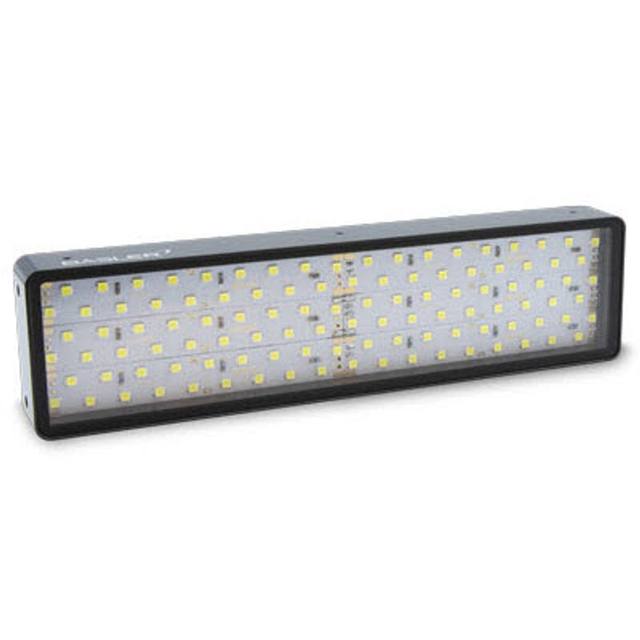
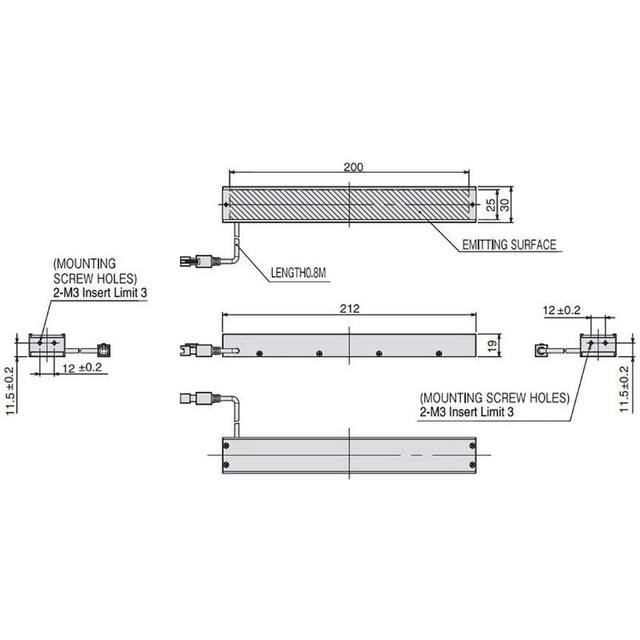
The FLV-BR8532 is an LED bar (linear) light in Omron's FLV machine-vision lighting series, intended for uniform illumination of wide, rectangular workpieces such as metal surfaces, LCD panels, and long printed parts. It has an 85 x 32 mm aluminium-alloy housing with a 73 x 25 mm lighting area, 20 mm height, and weighs 130 g. Color variants are FLV-BR8532W (white, 3.5 W), FLV-BR8532R (red, 3.1 W), and FLV-BR8532B (blue, 3.5 W); white and blue are LED Risk Group 2 and red is Risk Group 1 per IEC 62471. The light is powered and controlled through an Omron FLV-TCC or FLV-ATC lighting controller (24 VDC supply), with an optional FLV-BR8532DF diffusion plate and FLV-BR8532PL polarization plate.
Brand
Omron / Sentech
Lighting type
Bar (linear) light
Color / wavelength
White (also available in Red and Blue: FLV-BR8532W/R/B)
Available wavelengths
White (FLV-BR8532W), Red (FLV-BR8532R), Blue (FLV-BR8532B)
Mode
Continuous (controller-dependent; FLV-TCC/ATC controllers support strobe/overdrive)
Controller required
Yes - requires Omron FLV-TCC or FLV-ATC lighting controller
The FLV-BR8532 is a bar (linear) LED light from Omron's FLV machine-vision series, built around a 73 x 25 mm lighting area inside a compact 85 x 32 x 20 mm aluminium-alloy housing (20 mm height) that weighs only 130 g. The bar geometry is the defining characteristic: light is emitted across a long, narrow rectangular aperture rather than a ring or dome, which makes it suited to grazing or directional illumination of wide rectangular workpieces such as metal surfaces, LCD panels, and long printed parts. Mounted at a shallow angle, a bar light rakes across a surface so that scratches, dents, embossing, and edges throw shadows and stand out; mounted more steeply or paired across both sides, it provides even brightfield coverage of an elongated field of view. Because the emitting area is linear, the FLV-BR8532 is naturally matched to inspecting parts that are much wider than they are tall.
Wavelength is selected by part number rather than tuned in software: the family ships as white (FLV-BR8532W, 3.5 W), red (FLV-BR8532R, 3.1 W), and blue (FLV-BR8532B, 3.5 W). White gives broadband, color-neutral illumination useful for general surface and OCR work and for color inspection; red and blue shift contrast for monochrome imaging, with the shorter blue wavelength tending to emphasize fine surface texture and the longer red wavelength offering a different penetration and reflectance balance on materials. All variants run at low single-digit wattage, so heat load and power draw on the controller stay modest. Note the photobiological classification: per IEC 62471, the white and blue variants are LED Risk Group 2 and the red variant is Risk Group 1, which is a factor when planning operator exposure and guarding around an open installation.
The FLV-BR8532 is not a standalone device: it is powered and driven through an Omron FLV-TCC or FLV-ATC lighting controller on a 24 VDC supply, connected by cable to the controller's lighting output. This controller dependency is what unlocks the light's behavior beyond steady-state. The light itself is specified as continuous, but the FLV-TCC and FLV-ATC controllers support strobe and overdrive operation, meaning that when the application needs frozen motion on a moving line, the same fixture can be pulsed in sync with the camera trigger at higher instantaneous intensity. For tuning the optical effect, Omron offers an optional FLV-BR8532DF diffusion plate (also in DF50 / DF30 variants) to soften and spread the emission for glare-sensitive or specular surfaces, and an FLV-BR8532PL polarization plate to cut specular hotspots when combined with a polarizing filter on the lens.
Best for
Grazing-angle surface inspection of metal parts, where the low directional bar lighting raises shadow contrast on scratches, dents, and embossed features
Brightfield illumination of wide, flat rectangular workpieces such as LCD panels and long printed parts that exceed the coverage of a single ring or spot
OCR/OCV reading on elongated parts and labels, using the white variant for color-neutral, even lighting across the text field
Strobed inspection of moving lines, pulsing the bar via an FLV-TCC or FLV-ATC controller in sync with the camera to freeze motion and boost instantaneous intensity
Defect and packaging inspection on automotive, electronics, metal, and printing lines where a compact 130 g linear fixture must be mounted close to the conveyor
Selection notes
A controller is mandatory: budget and design in an Omron FLV-TCC or FLV-ATC lighting controller and a 24 VDC supply, since the FLV-BR8532 is powered and controlled through one of those controllers rather than driven directly. The controller is also what provides strobe/overdrive, so the choice of controller determines whether you can pulse the light
Choose the wavelength variant up front (W/R/B) because it is fixed in hardware, not software: white (3.5 W) for color and general work, blue (3.5 W) to emphasize fine surface texture, red (3.1 W) for an alternative monochrome contrast balance
Plan the mounting angle deliberately: a bar light gives dark-field/grazing contrast at shallow angles and brightfield coverage when more steeply placed or paired, so the same fixture behaves very differently depending on geometry and working distance
Add the FLV-BR8532DF diffusion plate (also DF50 / DF30) for specular or glare-prone surfaces, and the FLV-BR8532PL polarization plate (with a lens polarizer) where specular hotspots must be suppressed
Account for photobiological safety: white and blue are IEC 62471 Risk Group 2 and red is Risk Group 1, so consider operator exposure, shielding, and guarding around the installation
Specifications: General
Brand
Omron / Sentech
Lighting type
Bar (linear) light
Specifications: Interface
Connection
Cable to controller lighting connector
Specifications: Optical
Color / wavelength
White (also available in Red and Blue: FLV-BR8532W/R/B)
Available wavelengths
White (FLV-BR8532W), Red (FLV-BR8532R), Blue (FLV-BR8532B)
These steps take an Omron Sentech (STC) camera from the box to a stable first image and on to your own application. They apply across the GigE Vision, USB3 Vision and CoaXPress STC families; the interface only changes how you cable and power the camera.
Download and install the Sentech SDK on the host PC. The package provides StViewer, the viewing and configuration software you use to bring the camera up, and StApi, the programming SDK you integrate later. Because the cameras are GenICam/GenTL-compliant, StApi also registers a GenTL producer, so any GenICam-compliant third-party vision software can discover and drive the camera as an alternative front end.
2. Cable, power and connect the camera
Connect according to the interface. GigE Vision: link to a Gigabit NIC (use PoE or the separate power input) and put the camera and host on the same subnet; for USB3 Vision use a USB 3.x port and a certified cable; for CoaXPress (STC) connect to a CoaXPress frame grabber, which also supplies Power-over-Coax. Then open StViewer and let it enumerate the camera. If a GigE camera does not appear, check the IP configuration and firewall, and on USB3 confirm the host bandwidth and driver.
3. Configure exposure, gain and white balance
Open the device in StViewer and start a live stream. Set exposure and gain for a well-exposed, low-noise image: raise exposure first and only add gain when more light or a faster shutter is not an option, keeping exposure short enough to freeze motion on global-shutter models. On colour cameras, run white balance under your actual production lighting. Adjust the lens aperture and focus on a representative target before tuning anything else.
4. Set the trigger and grab a first image
Start in free-run (continuous) acquisition to confirm a clean, stable image. For inline inspection switch to hardware or software triggering: select the trigger source, set the active edge and any delay, and wire the strobe or illumination to the camera's I/O so lighting fires with each exposure. Acquire and save a frame in StViewer; this saved image is your reference for the SDK stage and for downstream inspection.
5. Move to the StApi SDK (or any GenICam software)
Once the image is stable, reproduce the same settings in code. Use StApi to open the device, apply the GenICam features you validated in StViewer (exposure, gain, trigger, pixel format) and grab frames into your application via the bundled C++, C, C#/.NET or Python interfaces; the included samples are the fastest starting point. Prefer a different stack? The same GenICam/GenTL camera works with third-party vision libraries. With a reliable feed, you can route it into a deep-learning inspection such as Rosepetal for AI-based defect detection.
Frequently asked questions
It requires a controller. The light is powered and controlled through an Omron FLV-TCC or FLV-ATC lighting controller on a 24 VDC supply, connected by cable to the controller's lighting output. It is not driven directly.
Three variants: white (FLV-BR8532W, 3.5 W), red (FLV-BR8532R, 3.1 W), and blue (FLV-BR8532B, 3.5 W). The color is selected by part number rather than changed in software.
The light itself is specified as continuous, but the FLV-TCC and FLV-ATC controllers support strobe and overdrive operation. With one of those controllers you can pulse the bar in sync with the camera to freeze motion and run at higher instantaneous intensity.
The lighting area is 73 x 25 mm. The fixture has an 85 x 32 x 20 mm aluminium-alloy housing (20 mm height) and weighs 130 g, making it a compact linear light for wide rectangular workpieces.
Omron offers an optional FLV-BR8532DF diffusion plate (also DF50 / DF30) to soften and spread the light for glare-sensitive surfaces, and an FLV-BR8532PL polarization plate to suppress specular hotspots when paired with a polarizing filter on the lens.