Skip to content
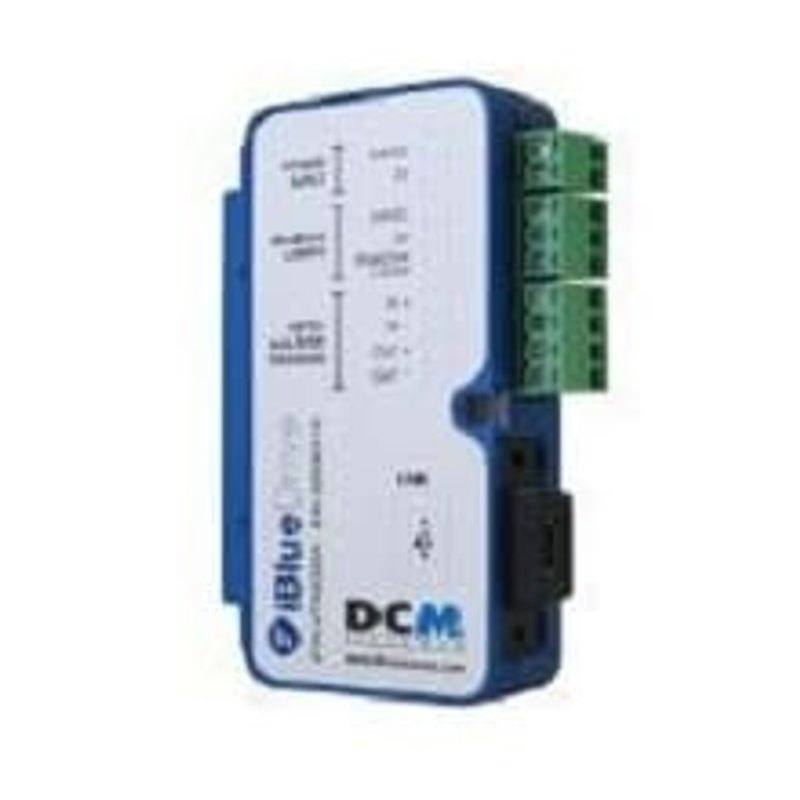
DCM Sistemes iBlueDriveBox machine vision lighting
  • Rosepetal compatible
  • Recommended by AIS Vision

DCM Sistemes iBlueDrive Box

iBlueDriveBox

The iBlueDrive Box is a hardware control/configuration interface that connects iBlueDrive lights to a PC or PLC, providing bidirectional communication and pulse transmission over a single cable while supplying electrical isolation from both the trigger signal and the control equipment's communications port. Up to 20 iBlueDrive devices can be connected to one box for individual control with simple wiring (Bulk Trigger), and it can generate pulse trains for multi-shot inspection of up to 16 shots with inter-shot times of 1 to 2,200 ms. Auto Trigger and Trigger Test functions let it generate single shots or configured pulse sequences (1-16 pulses) manually or automatically without an external trigger source, with sequence intervals configurable from 100 to 32,000 ms. It is used with the free iBlueDrive Control Manager software to adjust output power, pulse width and delays, and includes settings backup/restore; the iBlueDrive lights themselves run on 24 VDC and need no external controller, so the box can be removed after setup.

Brand
DCM Sistemes
Controller required
No (the iBlueDrive Box is itself the configuration interface; iBlueDrive lights need no external controller)
Mode
Strobe / continuous / overdrive (controls iBlueDrive intelligent strobe-integrated lights)
Supply voltage
24 VDC (iBlueDrive system / VCC series cable, Terminal 1: 24VDC +/-8%)
Connection
Single-cable 3-pin VDC connection to iBlueDrive lights; USB/communications to host PC
Driver technology
iBlueDrive intelligent strobe controller interface with bidirectional data bus

Technical overview

The DCM Sistemes iBlueDrive Box is not a light itself but the hardware control and configuration interface that connects iBlueDrive intelligent strobe-integrated illuminators to a host PC or PLC. Because the iBlueDrive lights carry their strobe driver onboard and run directly on 24 VDC, they need no separate continuous controller in production; the Box's role is to establish bidirectional communication over a single cable, transmit the trigger pulse, and provide electrical isolation from both the trigger signal and the control equipment's communications port. That isolation is a defining feature of the interface in electrically noisy cells.

Functionally the Box is built around pulse generation and configuration. A single unit can address up to 20 iBlueDrive devices for individual control with simplified wiring (the Bulk Trigger scheme), and it can emit pulse trains for multi-shot inspection of up to 16 shots with inter-shot times spanning 1 to 2,200 ms. Auto Trigger and Trigger Test functions let it fire single shots or full configured sequences (1 to 16 pulses) either manually or automatically with no external trigger source present, and sequence intervals are configurable from 100 to 32,000 ms. That self-triggering capability is useful for validating a lighting setup before a vision program issues real triggers.

Configuration is handled through the free iBlueDrive Control Manager software, which sets output power, pulse width, and delays, and supports settings backup and restore so a known-good lighting profile can be archived and re-applied. A defining characteristic of the system is that the Box can be physically removed after setup: once parameters are written into the iBlueDrive lights, they retain their configuration and run on 24 VDC alone. The Box is therefore best understood as a strobe/overdrive controller and provisioning interface for a family of smart lights, rather than a permanently wired inline driver.

Best for

  • Commissioning and tuning DCM iBlueDrive strobe-integrated lights, where output power, pulse width, and delays must be dialed in per inspection and then archived as a reusable profile
  • Multi-shot inspection sequences (up to 16 shots, inter-shot times 1-2,200 ms) such as multi-illumination surface defect capture from a single station
  • Strobe and overdrive lighting in fast-moving lines (packaging, traceability code reading, OCR/OCV) where freezing motion and isolated trigger timing are critical
  • Cells that bundle several lights on one interface: up to 20 iBlueDrive devices can be individually controlled from a single Box with simplified Bulk Trigger wiring
  • Electrically noisy automotive, metal, and electronics environments that need isolation between the trigger source, the vision PC's comms port, and the lighting

Selection notes

  • Confirm you are buying iBlueDrive-series lights: the Box controls and configures DCM's intelligent strobe-integrated illuminators and is the configuration interface for that family, not a generic LED strobe controller for third-party lights.
  • Decide whether you need the Box in production or only at setup. Because iBlueDrive lights store their configuration and run standalone on 24 VDC, one Box can provision many machines and be removed afterward, lowering per-cell cost.
  • Check that the timing envelope fits your application: pulse trains up to 16 shots, inter-shot 1-2,200 ms, and standalone sequence intervals 100-32,000 ms. Inter-shot timing faster than the 1 ms floor is outside this range.
  • Size the channel count against the 20-device limit per Box, and plan Bulk Trigger wiring if you intend to drive multiple lights individually from one interface rather than running separate triggers.
  • Verify the supply and signal chain: 24 VDC +/-8% on the VCC cable, a single-cable 3-pin VDC link to the lights, and a USB/communications path to the host running iBlueDrive Control Manager. Use the built-in isolation rather than improvising ground separation.
  • Use settings backup/restore so a validated lighting profile is saved and can be re-applied if a light is swapped or a machine is duplicated.

Specifications: General
BrandDCM Sistemes

Specifications: Interface
ConnectionSingle-cable 3-pin VDC connection to iBlueDrive lights; USB/communications to host PC

Specifications: Electrical
Controller requiredNo (the iBlueDrive Box is itself the configuration interface; iBlueDrive lights need no external controller)
ModeStrobe / continuous / overdrive (controls iBlueDrive intelligent strobe-integrated lights)
Supply voltage24 VDC (iBlueDrive system / VCC series cable, Terminal 1: 24VDC +/-8%)
Driver technologyiBlueDrive intelligent strobe controller interface with bidirectional data bus

Frequently asked questions

Related technical guides

Rosepetal · AI

Test this camera with Rosepetal

Validate your visual inspection with AI: send us sample images and we evaluate the case on your hardware.

AIS Vision · Integration

We validate camera + lens + lighting

AIS Vision defines and tests the optimal combination of camera, optics and lighting for your application before you buy.