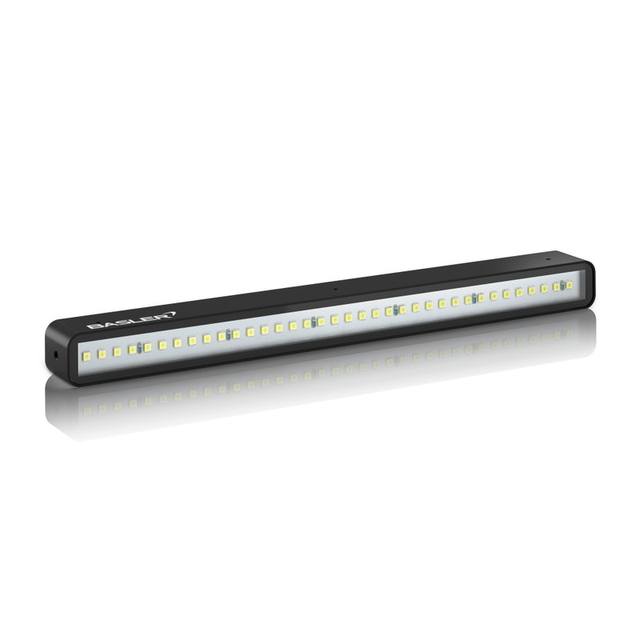
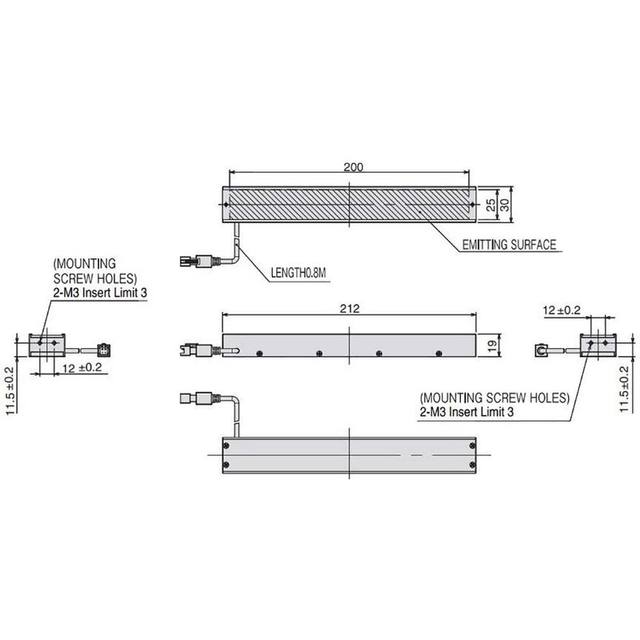
The FLV-BR21222 is a bar (linear) light unit in Omron's FLV Series, offered in white (FLV-BR21222W), red (FLV-BR21222R, peak 635 nm) and blue (FLV-BR21222B, peak 465 nm) variants. It has an outside dimension of 212 x 22 mm with a 199 x 18 mm lighting area, a height of 16 mm, an aluminum-alloy case and a weight of about 140 g. The light is driven and dimmed through an Omron FLV-TCC camera-mount lighting controller, powered at 24 VDC (or 12 V supplied directly from the camera), with digital intensity control that supports continuous and trigger (strobe) lighting. Power consumption is 8.7 W for white and blue and 5.0 W for the red variant; an optional diffusion plate (FLVBR21222DF) and polarization plate are available.
Brand
Omron / Sentech
Lighting type
Bar (linear) light
Color / wavelength
White (also Red ~635 nm / Blue ~465 nm variants)
Available wavelengths
White (W), Red 635 nm (R), Blue 465 nm (B)
Mode
Continuous or trigger (strobe) lighting via controller, digital intensity control
The FLV-BR21222 is a bar (linear) LED light from Omron's FLV series, built around a high-density LED array in a compact 212 x 22 mm aluminum-alloy housing only 16 mm tall, with an active lighting area of 199 x 18 mm and a weight of about 140 g. Its long, narrow emitting strip is the defining geometry: a bar light grazes or floods a wide rectangular band of the scene rather than illuminating a circular spot, which makes it the natural tool for elongated parts, moving web, conveyor lanes, and any field of view that is much wider than it is tall. Mounted at a shallow angle to the surface it produces directional grazing light that throws long shadows from scratches, dents, embossing, and edges; mounted more frontally it acts as a bright general illuminator for a strip-shaped region. Because the active area is a hard-edged line of LEDs, an optional FLVBR21222DF diffusion plate is offered to soften the source and even out hotspots when you need a smoother, more uniform wash, and a polarization plate is available to suppress specular glare on shiny or wet surfaces.
The unit is not self-driven: it requires an Omron FLV-TCC camera-mount lighting controller, which supplies and dims it and provides the link to the camera. Power is 24 VDC through the FLV-TCC, or 12 V supplied directly from the camera, and the controller delivers digital intensity control so brightness is set in software rather than by a potentiometer. Critically, the controller supports both continuous and trigger (strobe) operation: in continuous mode the bar runs as steady illumination for stationary or slow inspection, while in trigger/strobe mode it fires a short, repeatable pulse synchronized to each image. That strobe capability is what lets the bar freeze motion on a moving line, hold exposure consistent frame to frame, and protect LED life by only energizing during the actual capture window. Power consumption is modest at 8.7 W for the white and blue variants and 5.0 W for the red, so a single FLV-TCC channel comfortably drives it.
Color choice changes what the bar reveals. The white variant gives broadband illumination suited to color inspection and general-purpose imaging; the red variant (peak ~635 nm) penetrates and reflects well off many materials, often improving contrast on printed marks and reducing sensitivity to ambient light; and the blue variant (peak ~465 nm) delivers short-wavelength light that sharpens fine surface detail and edge contrast on metals and other reflective substrates. All three share the same mechanical footprint and the same FLV-TCC drive, so the wavelength can be selected purely on the imaging task without redesigning the fixture or wiring. The aluminum-alloy case acts as a heatsink for the LED array and keeps the assembly rigid and lightweight enough for camera-adjacent or gantry mounting in a vision cell.
Best for
Grazing-angle surface inspection of elongated parts: revealing scratches, dents, embossing and edge defects on long components by mounting the bar at a low angle to cast directional shadows
Wide web, sheet and conveyor-lane imaging where the field of view is much wider than it is tall and a circular ring or spot light would leave the strip unevenly lit
Print and code reading on labels and packaging, using the red 635 nm variant to lift contrast on printed text and codes for OCR/OCV and traceability tasks
Reflective metal and electronics/semiconductor surface inspection using the blue 465 nm variant to sharpen fine detail and edge contrast
High-speed line scanning of moving product, driven in trigger/strobe mode through the FLV-TCC controller to freeze motion and hold exposure consistent frame to frame
Selection notes
Budget for the FLV-TCC controller: this bar cannot be used standalone. It must be driven and dimmed by an Omron FLV-TCC camera-mount lighting controller, which also handles the continuous-versus-strobe mode and the digital intensity setting.
Confirm your power source: the controller expects 24 VDC, though 12 V can be supplied directly from the camera. Match the FLV-TCC channel rating to the 8.7 W (white/blue) or 5.0 W (red) draw of the variant you choose.
Pick the wavelength for the task, not the fixture: white for color/general imaging, red ~635 nm for print/code contrast and ambient-light immunity, blue ~465 nm for fine detail on reflective metals. All three variants share the same 212 x 22 mm body and wiring, so the decision is purely optical.
Plan the working angle and field shape around the bar geometry: the 199 x 18 mm active line suits wide rectangular fields and grazing-shadow techniques. For shorter or square fields, or full circumferential coverage, a single bar will under-light the edges and you may need multiple bars or a different geometry.
Add the optional diffusion plate (FLVBR21222DF) when the raw LED line produces hotspots or you need a softer, more uniform wash, and the polarization plate when specular glare on shiny or wet surfaces is washing out the image. Neither is included by default.
Specifications: General
Brand
Omron / Sentech
Lighting type
Bar (linear) light
Specifications: Interface
Connection
Lighting connecting cable/connector to FLV-TCC controller
These steps take an Omron Sentech (STC) camera from the box to a stable first image and on to your own application. They apply across the GigE Vision, USB3 Vision and CoaXPress STC families; the interface only changes how you cable and power the camera.
Download and install the Sentech SDK on the host PC. The package provides StViewer, the viewing and configuration software you use to bring the camera up, and StApi, the programming SDK you integrate later. Because the cameras are GenICam/GenTL-compliant, StApi also registers a GenTL producer, so any GenICam-compliant third-party vision software can discover and drive the camera as an alternative front end.
2. Cable, power and connect the camera
Connect according to the interface. GigE Vision: link to a Gigabit NIC (use PoE or the separate power input) and put the camera and host on the same subnet; for USB3 Vision use a USB 3.x port and a certified cable; for CoaXPress (STC) connect to a CoaXPress frame grabber, which also supplies Power-over-Coax. Then open StViewer and let it enumerate the camera. If a GigE camera does not appear, check the IP configuration and firewall, and on USB3 confirm the host bandwidth and driver.
3. Configure exposure, gain and white balance
Open the device in StViewer and start a live stream. Set exposure and gain for a well-exposed, low-noise image: raise exposure first and only add gain when more light or a faster shutter is not an option, keeping exposure short enough to freeze motion on global-shutter models. On colour cameras, run white balance under your actual production lighting. Adjust the lens aperture and focus on a representative target before tuning anything else.
4. Set the trigger and grab a first image
Start in free-run (continuous) acquisition to confirm a clean, stable image. For inline inspection switch to hardware or software triggering: select the trigger source, set the active edge and any delay, and wire the strobe or illumination to the camera's I/O so lighting fires with each exposure. Acquire and save a frame in StViewer; this saved image is your reference for the SDK stage and for downstream inspection.
5. Move to the StApi SDK (or any GenICam software)
Once the image is stable, reproduce the same settings in code. Use StApi to open the device, apply the GenICam features you validated in StViewer (exposure, gain, trigger, pixel format) and grab frames into your application via the bundled C++, C, C#/.NET or Python interfaces; the included samples are the fastest starting point. Prefer a different stack? The same GenICam/GenTL camera works with third-party vision libraries. With a reliable feed, you can route it into a deep-learning inspection such as Rosepetal for AI-based defect detection.
Frequently asked questions
It needs a controller. The bar light is driven, dimmed and switched by an Omron FLV-TCC camera-mount lighting controller, which provides the 24 VDC supply (or 12 V from the camera), the digital intensity control, and the selection between continuous and trigger (strobe) operation.
Yes. Through the FLV-TCC controller it supports both continuous lighting and trigger (strobe) operation, so it can fire a short synchronized pulse per image to freeze motion and keep exposure repeatable on a moving line.
Three variants share the same housing: white (FLV-BR21222W) for broadband/color imaging, red (FLV-BR21222R, peak ~635 nm) which favors print and code contrast and ambient-light immunity, and blue (FLV-BR21222B, peak ~465 nm) for sharpening fine detail and edges on reflective metals.
The lighting (active) area is 199 x 18 mm. The overall housing is 212 x 22 mm with a height of 16 mm, made of aluminum alloy, and weighs about 140 g.
Power consumption is 8.7 W for the white and blue variants and 5.0 W for the red variant, supplied at 24 VDC (or 12 V from the camera) through the FLV-TCC controller.
No diffuser is included by default. An optional diffusion plate (FLVBR21222DF) is available to soften the LED line and even out hotspots, and a polarization plate is offered separately to suppress specular glare on shiny or wet surfaces.