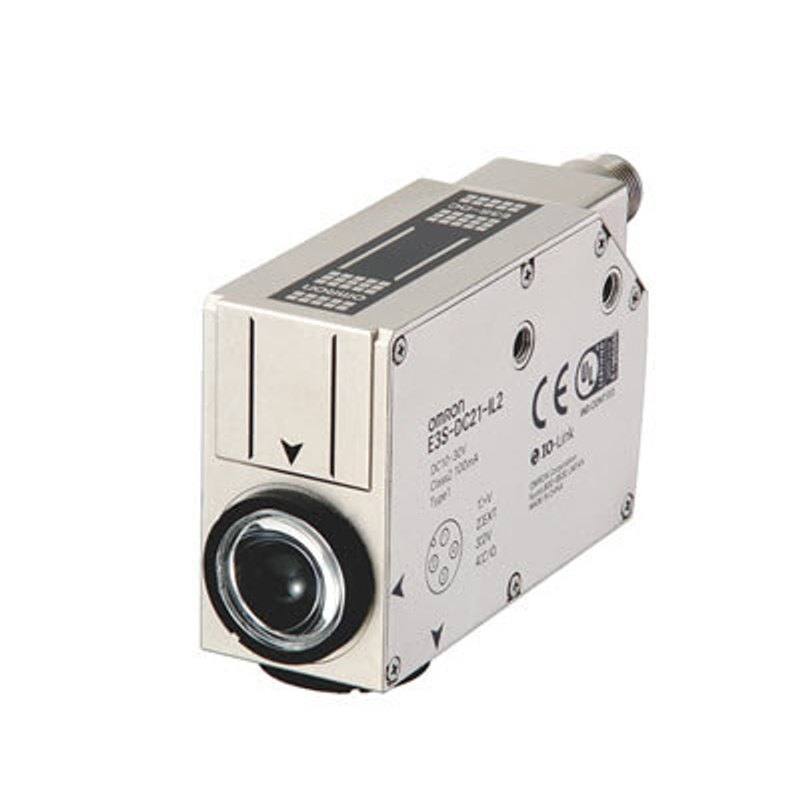
Omron / Sentech E3S-DCP21-IL3 Color Mark Photoelectric Sensor (IO-Link COM3)
E3S-DCP21-IL3
The E3S-DCP21-IL3 detects color marks at a sensing distance of 10 +/-3 mm using a three-element RGB LED light source (red 635 nm, green 525 nm, blue 465 nm) with a 1 x 4 mm spot. It provides a push-pull control output (load current 100 mA max, 30 VDC max) and an operate/reset response time of 50 us max in 2-point teaching mode (150 us max in 1-point mode). The sensor runs on 10 to 30 VDC, consumes 960 mW max (40 mA at 24 V), is rated IP67, and connects via an M12 4-pin connector. It supports IO-Link version 1.1 at COM3 (230.4 kbps) with a minimum cycle time of 1.5 ms, enabling RGB data transmission to the host.
Brand
Omron / Sentech
Sensor type
Contrast / color mark sensor
Range / distance
Sensing distance 10 +/-3 mm (white paper 10 x 10 mm)
Response time
Operate/reset 50 us max (2-point teaching mode)
Communication
IO-Link 1.1, COM3 (230.4 kbps)
IP rating
IP67 (IEC 60529)
Supply voltage
10 to 30 VDC +/-10% (ripple p-p 10% max)
Power consumption
960 W
Operating temperature
Operating -10 to 55 C; Storage -25 to 70 C (no icing/condensation)
The E3S-DCP21-IL3 is a diffuse color mark sensor, meaning it floods a small target area with its own light and reads the light scattered back from the surface directly in front of it. Rather than measuring distance or simple presence, it discriminates color and contrast: a three-element RGB LED source emits red at 635 nm, green at 525 nm and blue at 465 nm, and the sensor compares how each of those wavelengths reflects off the target to recognize a taught registration or print mark against its background. Because all three colors are available, it can lock onto marks that a single-wavelength contrast sensor would miss, where the mark and the web differ in hue more than in brightness. The light is focused into a compact 1 x 4 mm spot, so it resolves narrow eye-marks and thin printed registration lines as they pass.
The sensor is specified for a sensing distance of 10 +/-3 mm against a 10 x 10 mm white-paper reference, so it must be mounted with its face roughly 10 mm from the moving surface and within that few-millimeter window for the taught contrast values to hold. Speed is its defining trait. In 2-point teaching mode the operate/reset response time is 50 us maximum (rising to 150 us maximum in 1-point mode), which lets it flag marks reliably on fast-moving packaging webs and feed clean edges to downstream control. The taught state and the live RGB readings are exposed two ways: a push-pull control output rated 100 mA maximum at up to 30 VDC for hardwired signaling, and IO-Link 1.1 running at COM3 (230.4 kbps) with a 1.5 ms minimum cycle time, which transmits the RGB data digitally to the host controller.
Electrically it is straightforward to integrate: it runs on 10 to 30 VDC, draws only about 960 mW maximum (40 mA at 24 V), and terminates in an M12 4-pin connector. The IP67 (IEC 60529) housing and an operating range of -10 to 55 C suit it to packaging, printing and food-and-beverage lines, though storage is rated -25 to 70 C with no icing or condensation. In a vision context this device is not a camera but a discrete trigger and color-reference source: its fast contrast switching point can be wired to start a camera acquisition or a print-registration cut/control action as a mark passes, and over IO-Link its RGB stream can be logged alongside inspection results for traceability.
Best for
Detecting printed registration or eye-marks on a high-speed packaging web to trigger cutting, sealing or filling at the correct position
Verifying the presence and color of a print mark on flexible film or labels in a printing line
Color-coded part or batch verification on food and beverage packaging where mark hue, not just brightness, distinguishes good from bad
Generating a fast, position-accurate trigger pulse to a machine-vision camera as marked product passes a fixed station
Feeding live RGB readings over IO-Link COM3 to a host PLC or controller for traceability logging and centralized teaching across format changeovers
Selection notes
Mount the sensor face at the specified 10 +/-3 mm from the target surface; the taught contrast is tied to this sensing distance, so working outside that few-millimeter window will degrade detection and is the first thing to control on the bracket design.
Choose the teaching mode for your speed budget: 2-point teaching gives the 50 us response needed for fast webs, while 1-point teaching is simpler but slower at 150 us; verify the mark dwell time at your line speed against the 1 x 4 mm spot.
Decide between the push-pull control output (100 mA max, 30 VDC max) for direct hardwired triggering and IO-Link 1.1 COM3 if you need digital RGB data and remote teaching; the M12 4-pin connection serves the chosen mode on a 10 to 30 VDC supply.
Confirm the environment fits IP67 and the -10 to 55 C operating range; for sustained high-pressure wash-down, freezing zones or condensation-prone areas, plan protection or select a sensor with a wider environmental rating.
If the application is full 2D inspection, code reading or dimensional measurement rather than single-mark contrast detection, this sensor only provides a trigger/contrast point and should be paired with a vision camera or replaced by a dedicated code reader or measurement sensor.
Specifications: General
Brand
Omron / Sentech
Sensor type
Contrast / color mark sensor
Specifications: Performance
Range / distance
Sensing distance 10 +/-3 mm (white paper 10 x 10 mm)
Response time
Operate/reset 50 us max (2-point teaching mode)
Specifications: Interface
Communication
IO-Link 1.1, COM3 (230.4 kbps)
Connection
M12 connector
Specifications: Electrical
Supply voltage
10 to 30 VDC +/-10% (ripple p-p 10% max)
Power consumption
960 W
Specifications: Environment
IP rating
IP67 (IEC 60529)
Operating temperature
Operating -10 to 55 C; Storage -25 to 70 C (no icing/condensation)
Specifications: Mechanical
Weight
370 g
Specifications: Sensing
Sensing method
Diffuse
Specifications: Output
Output type
IO-Link / Push-pull
Applications this camera is commonly selected for. Open one to see the full recommended hardware and approach.
These steps take an Omron Sentech (STC) camera from the box to a stable first image and on to your own application. They apply across the GigE Vision, USB3 Vision and CoaXPress STC families; the interface only changes how you cable and power the camera.
Download and install the Sentech SDK on the host PC. The package provides StViewer, the viewing and configuration software you use to bring the camera up, and StApi, the programming SDK you integrate later. Because the cameras are GenICam/GenTL-compliant, StApi also registers a GenTL producer, so any GenICam-compliant third-party vision software can discover and drive the camera as an alternative front end.
2. Cable, power and connect the camera
Connect according to the interface. GigE Vision: link to a Gigabit NIC (use PoE or the separate power input) and put the camera and host on the same subnet; for USB3 Vision use a USB 3.x port and a certified cable; for CoaXPress (STC) connect to a CoaXPress frame grabber, which also supplies Power-over-Coax. Then open StViewer and let it enumerate the camera. If a GigE camera does not appear, check the IP configuration and firewall, and on USB3 confirm the host bandwidth and driver.
3. Configure exposure, gain and white balance
Open the device in StViewer and start a live stream. Set exposure and gain for a well-exposed, low-noise image: raise exposure first and only add gain when more light or a faster shutter is not an option, keeping exposure short enough to freeze motion on global-shutter models. On colour cameras, run white balance under your actual production lighting. Adjust the lens aperture and focus on a representative target before tuning anything else.
4. Set the trigger and grab a first image
Start in free-run (continuous) acquisition to confirm a clean, stable image. For inline inspection switch to hardware or software triggering: select the trigger source, set the active edge and any delay, and wire the strobe or illumination to the camera's I/O so lighting fires with each exposure. Acquire and save a frame in StViewer; this saved image is your reference for the SDK stage and for downstream inspection.
5. Move to the StApi SDK (or any GenICam software)
Once the image is stable, reproduce the same settings in code. Use StApi to open the device, apply the GenICam features you validated in StViewer (exposure, gain, trigger, pixel format) and grab frames into your application via the bundled C++, C, C#/.NET or Python interfaces; the included samples are the fastest starting point. Prefer a different stack? The same GenICam/GenTL camera works with third-party vision libraries. With a reliable feed, you can route it into a deep-learning inspection such as Rosepetal for AI-based defect detection.
Frequently asked questions
It is a diffuse color mark sensor that recognizes a taught print or registration mark by contrast and color. Its three-element RGB LED source (red 635 nm, green 525 nm, blue 465 nm) lets it distinguish marks from the background by hue as well as brightness, which is why it suits packaging eye-marks and registration lines.
The operate/reset response time is 50 us maximum in 2-point teaching mode, and 150 us maximum in 1-point teaching mode. The faster 2-point mode is intended for high-speed webs where the mark passes the 1 x 4 mm spot very quickly.
It is specified for a sensing distance of 10 +/-3 mm, measured against a 10 x 10 mm white-paper reference. It should be positioned with its face about 10 mm from the moving surface and kept within that tolerance band so the taught contrast holds.
It offers a push-pull control output rated 100 mA maximum at up to 30 VDC for hardwired signaling, plus IO-Link 1.1 communication at COM3 (230.4 kbps) with a 1.5 ms minimum cycle time. The IO-Link link can transmit the RGB data digitally to the host.
Yes. It is not a camera itself, but its fast contrast switching output is well suited to generating a position-accurate trigger pulse as a marked product passes, starting a camera acquisition or a registration control action. Its RGB data can also be logged over IO-Link alongside inspection results.
It is rated IP67 per IEC 60529 with an operating temperature range of -10 to 55 C, which fits typical packaging, printing and food-and-beverage lines. It runs on 10 to 30 VDC, draws about 960 mW maximum, and connects via an M12 4-pin connector.