Omron / Sentech FLV-DR9215 Direct Ring Light (92 mm dia.)
FLV-DR9215
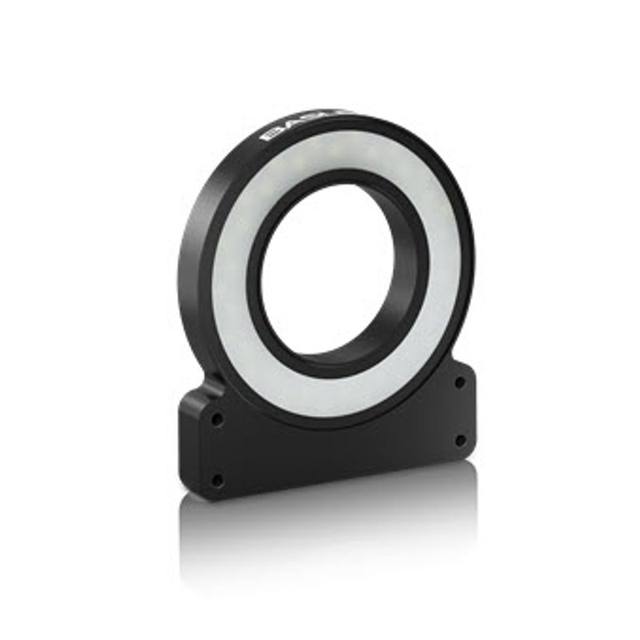
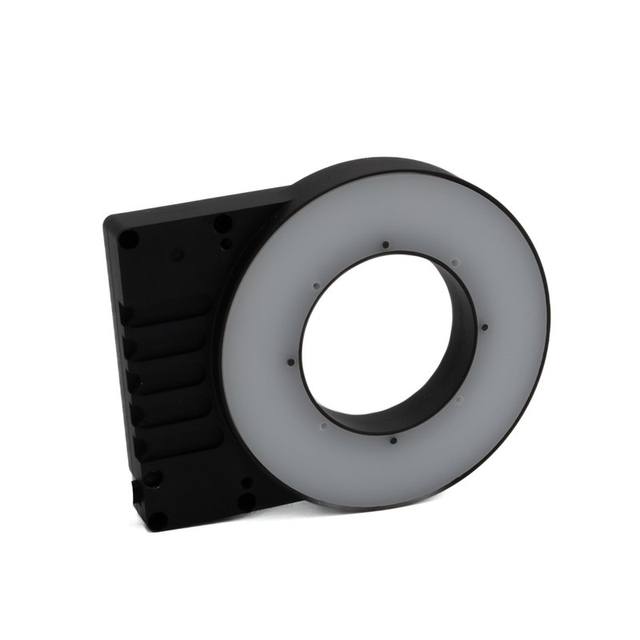
The FLV-DR9215 is a direct ring light unit in Omron's FLV machine-vision lighting series, using high-density LED arrays in a 92 mm outer / 47 mm inner diameter aluminum ring with a 15 degree light-emitting angle. It is offered in three colors: white (FLV-DR9215W), red (FLV-DR9215R, typ. 635 nm) and blue (FLV-DR9215B, typ. 460 nm), with power consumption of 7.4 W (white/blue) and 5.4 W (red). The light has no built-in driver and must be connected to a dedicated FLV lighting controller (FLV-TCC4 / -TCC1 / -TCC3HB or FLV-ATC1024) via its integral 0.8 m cable; an optional diffuser plate (FLV-DR9000DF) and polarizing plate (FLV-DR-PL) are available. Rated protection is IP20 with an operating temperature range of 0 to +50 degrees C and a weight of approximately 200 g.
Brand
Omron / Sentech
Lighting type
Direct ring light
Color / wavelength
White (also Red typ. 635 nm and Blue typ. 460 nm variants)
Available wavelengths
White (W), Red (R, typ. 635 nm), Blue (B, typ. 460 nm)
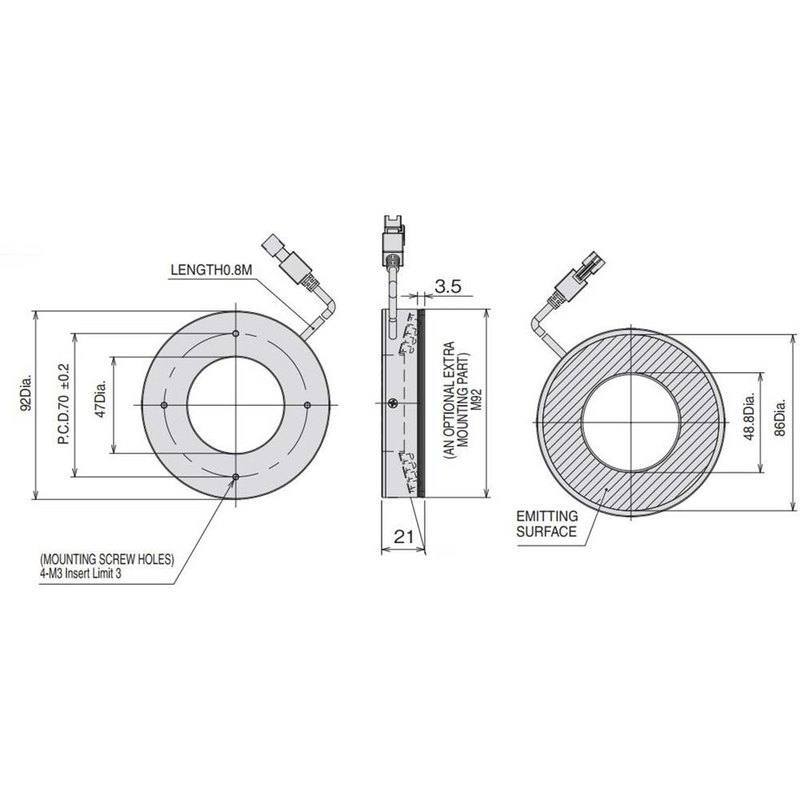
The FLV-DR9215 is a direct ring light from Omron's FLV machine-vision lighting series, built around a high-density LED array in a 92 mm outer / 47 mm inner diameter aluminum ring. As a direct ring, it mounts coaxially around the lens and floods the target with bright, on-axis-adjacent illumination from a tight 15 degree emission angle. That narrow angle is the defining geometric trait: rather than spreading light broadly, it concentrates the beam toward a defined working distance, maximizing intensity on the part and producing crisp, high-contrast images that suit feature detection, defect inspection and code reading on relatively flat or shallow surfaces. The compact ~10.7 mm depth and 70 mm mounting P.C.D. let it sit close behind the lens for tight optical packaging.
The unit is a passive light head with no built-in driver, so it must be connected to a dedicated FLV lighting controller (FLV-TCC4 / -TCC1 / -TCC3HB or FLV-ATC1024) through its integral 0.8 mm-class 3.5 mm-diameter, 0.8 m cable. Routing power and timing through the controller is what makes the light usable in both continuous and strobe modes: the controller supplies the LEDs from an external 24 VDC source and, in strobe operation, can overdrive and gate the array in sync with the camera trigger to freeze motion on moving lines. This controller dependency should be treated as a required line item, not an accessory, and the controller choice determines available overdrive, dimming and trigger-input behavior.
Wavelength is selectable by ordering one of three color variants on the same mechanical platform: white (FLV-DR9215W), red (FLV-DR9215R, typ. 635 nm) and blue (FLV-DR9215B, typ. 460 nm). White gives broadband illumination for general and color imaging; red at 635 nm penetrates and reflects well off many materials and pairs cleanly with monochrome sensors for stable, high-contrast inspection; blue at 460 nm provides shorter-wavelength light that emphasizes fine surface texture and edges. Power draw reflects the LED load - 7.4 W for white and blue, 5.4 W for red. Mechanically the light is rated IP20 with an aluminum case for heat dissipation, operates from 0 to +50 degrees C, and weighs about 200 g. The IP20 rating marks it as a clean-environment, in-cabinet or enclosed-station light rather than a washdown-rated unit. Optional diffuser (FLV-DR9215DF) and polarizing (FLV-DR-PL) plates extend it toward softer illumination or glare suppression on reflective parts.
Best for
High-contrast surface and defect inspection of flat or shallow parts placed near the ring's working distance, where the 15 degree narrow beam concentrates intensity for crisp feature detection
OCR/OCV and 2D/DPM code reading on electronics, packaging and metal parts, using the red (635 nm) or blue (460 nm) variant with a monochrome camera for stable contrast
Coaxially-mounted lens-around illumination in space-constrained stations, exploiting the ~10.7 mm depth, 70 mm P.C.D. and 92 mm outer diameter
Strobed, motion-freezing inspection on moving lines when driven by an FLV controller (FLV-TCC4 / -TCC1 / -TCC3HB / -ATC1024) synchronized to the camera trigger
Reflective-part inspection where the optional polarizing plate (FLV-DR-PL) suppresses glare, or diffuser plate (FLV-DR9215DF) softens hotspots
Selection notes
The light has no built-in driver: a dedicated FLV lighting controller (FLV-TCC4, -TCC1, -TCC3HB or FLV-ATC1024) is mandatory and must be specified and budgeted alongside the head, with an external 24 VDC supply feeding the controller
Choose the wavelength variant at order time - white (W) for broadband/color, red (635 nm) for penetration and monochrome contrast, blue (460 nm) for fine surface and edge detail; the three share the same 92 mm mechanical body but are distinct part numbers
The 15 degree narrow emission angle is tuned to a specific working distance; verify your standoff and field of view match the beam's concentration zone, as it is not a wide-flood light
IP20 protection limits deployment to clean, enclosed or in-cabinet stations - it is not suitable for washdown, dusty or high-ingress environments without additional enclosure
Account for the integral 0.8 m, 3.5 mm-diameter cable when planning controller placement; the 70 mm mounting P.C.D., 47 mm inner clear aperture and ~200 g weight must be checked against lens diameter and bracket design
If reflections or hotspots are expected on glossy parts, plan for the optional diffuser (FLV-DR9215DF) or polarizing (FLV-DR-PL) plates early, since they change effective intensity and working geometry
Specifications: General
Brand
Omron / Sentech
Lighting type
Direct ring light
Specifications: Interface
Connection
Integral cable, 3.5 mm dia., 0.8 m length, to controller connector
Specifications: Optical
Color / wavelength
White (also Red typ. 635 nm and Blue typ. 460 nm variants)
Available wavelengths
White (W), Red (R, typ. 635 nm), Blue (B, typ. 460 nm)
Diffuser
No (optional diffuser plate FLV-DR9215DF available)
These steps take an Omron Sentech (STC) camera from the box to a stable first image and on to your own application. They apply across the GigE Vision, USB3 Vision and CoaXPress STC families; the interface only changes how you cable and power the camera.
Download and install the Sentech SDK on the host PC. The package provides StViewer, the viewing and configuration software you use to bring the camera up, and StApi, the programming SDK you integrate later. Because the cameras are GenICam/GenTL-compliant, StApi also registers a GenTL producer, so any GenICam-compliant third-party vision software can discover and drive the camera as an alternative front end.
2. Cable, power and connect the camera
Connect according to the interface. GigE Vision: link to a Gigabit NIC (use PoE or the separate power input) and put the camera and host on the same subnet; for USB3 Vision use a USB 3.x port and a certified cable; for CoaXPress (STC) connect to a CoaXPress frame grabber, which also supplies Power-over-Coax. Then open StViewer and let it enumerate the camera. If a GigE camera does not appear, check the IP configuration and firewall, and on USB3 confirm the host bandwidth and driver.
3. Configure exposure, gain and white balance
Open the device in StViewer and start a live stream. Set exposure and gain for a well-exposed, low-noise image: raise exposure first and only add gain when more light or a faster shutter is not an option, keeping exposure short enough to freeze motion on global-shutter models. On colour cameras, run white balance under your actual production lighting. Adjust the lens aperture and focus on a representative target before tuning anything else.
4. Set the trigger and grab a first image
Start in free-run (continuous) acquisition to confirm a clean, stable image. For inline inspection switch to hardware or software triggering: select the trigger source, set the active edge and any delay, and wire the strobe or illumination to the camera's I/O so lighting fires with each exposure. Acquire and save a frame in StViewer; this saved image is your reference for the SDK stage and for downstream inspection.
5. Move to the StApi SDK (or any GenICam software)
Once the image is stable, reproduce the same settings in code. Use StApi to open the device, apply the GenICam features you validated in StViewer (exposure, gain, trigger, pixel format) and grab frames into your application via the bundled C++, C, C#/.NET or Python interfaces; the included samples are the fastest starting point. Prefer a different stack? The same GenICam/GenTL camera works with third-party vision libraries. With a reliable feed, you can route it into a deep-learning inspection such as Rosepetal for AI-based defect detection.
Frequently asked questions
Yes. The light head has no built-in driver and must be connected to a dedicated Omron FLV lighting controller - FLV-TCC4, FLV-TCC1, FLV-TCC3HB or FLV-ATC1024 - via its integral 0.8 m cable. The controller is powered from an external 24 VDC supply.
Three variants on the same body: white (FLV-DR9215W), red (FLV-DR9215R, typ. 635 nm) and blue (FLV-DR9215B, typ. 460 nm). They are ordered as separate part numbers.
Yes. Through the FLV controller it can run continuous or strobe; in strobe mode the controller gates the LED array in sync with the camera trigger to freeze motion on a moving line.
It has a narrow 15 degree light-emitting angle, concentrating intensity toward a defined working distance rather than spreading a wide flood - well suited to high-contrast inspection of parts placed near that standoff.
No. It is rated IP20 to IEC 60529 and operates from 0 to +50 degrees C, so it is intended for clean, enclosed or in-cabinet stations rather than washdown, wet or high-ingress areas.
It is a 92 mm outer / 47 mm inner diameter aluminum ring, approximately 10.7 mm deep with a 70 mm mounting P.C.D., weighing about 200 g. Optional diffuser (FLV-DR9215DF) and polarizing (FLV-DR-PL) plates are available.