Omron / Sentech E3NX-CA Colour Fiber Amplifier Series
E3NX-CA
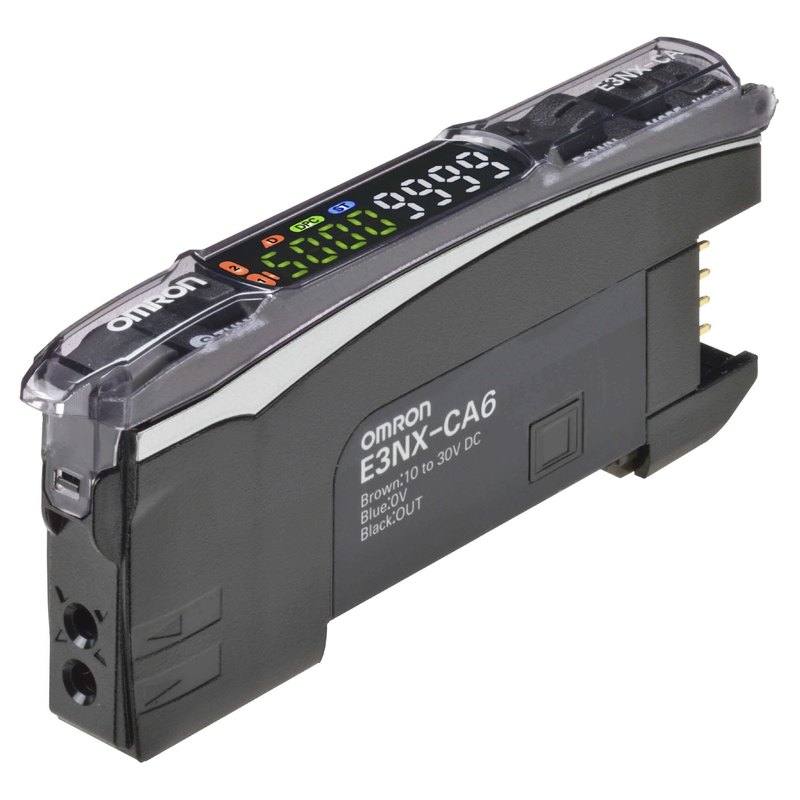
The E3NX-CA is a smart fiber amplifier unit that uses a white LED light source (420–700 nm) to detect subtle color differences via either Contrast Mode (RGB intensity discrimination) or Color Mode (RGB ratio comparison). It offers four response speed modes ranging from 50 µs (Super-High-Speed) to 16 ms (Giga-Power), making it suitable for high-speed packaging and printing lines. The unit mounts on DIN rail, supports up to 30 cascaded units with mutual interference prevention, and can be networked over EtherCAT through the optional E3NW-ECT Sensor Communications Unit. It is designed for use with Omron E32 color fiber heads and existing general-purpose fiber heads.
Brand
Omron / Sentech
Sensor type
Contrast / Color (fiber amplifier)
Sensing method
Fiber (reflective or through-beam via E32 fiber heads)
Light source
White LED, 420–700 nm
Supply voltage
10–30 VDC (incl. 10% ripple p-p)
Response time
0.05 ms (Super-High-Speed, Contrast Mode); 0.25 ms (High-Speed); 1 ms (Standard); 16 ms (Giga-Power)
Output type
NPN or PNP open-collector; load current 100 mA max (groups 1–3), 20 mA max (groups 4–30); 30 VDC max
Communication
EtherCAT via optional E3NW-ECT Sensor Communications Unit
IP rating
IP50
Housing material
Polycarbonate (case and cover)
Dimensions
33.5 (H) × 10 (W) × 75.3 (D) mm (wire-saving connector models); 33.5 × 10 × 90.8 mm (E3NX-CA0 comm unit model)
Weight
Approx. 75 g (sensor only, pre-wired); approx. 25 g (sensor only, wire-saving connector model)
The E3NX-CA is a digital fiber amplifier built around a white LED light source spanning 420–700 nm — the full visible spectrum. This broadband emission is what separates it from simpler single-wavelength sensors: the amplifier can evaluate how a target reflects or transmits energy across the red, green, and blue channels simultaneously, giving it two fundamentally different discrimination modes. In Contrast Mode the unit compares RGB intensity between a learned reference and the current reading, which is ideal for detecting marks and edges where overall reflectivity differs. In Color Mode it uses an RGB ratio comparison — the relative proportion of each channel — so the decision is independent of target distance or ambient light fluctuations that shift intensity uniformly. This ratio-based logic is what lets the sensor distinguish a dark-green label from a dark-navy label even when both appear equally dim to a single-wavelength sensor.
Four selectable response-speed modes cover a wide span of line speeds from a single hardware platform. Super-High-Speed mode reaches 0.05 ms (50 µs) in Contrast Mode, appropriate for packaging lines running at several hundred parts per minute where the mark or edge is present for only a fraction of a millisecond. High-Speed mode at 0.25 ms and Standard mode at 1 ms progressively increase signal averaging and noise immunity, which matters when the fiber head geometry or target surface produces a noisy return. Giga-Power mode at 16 ms maximises light integration time and is the right choice for difficult low-contrast targets on slower lines. Output is NPN or PNP open-collector rated to 100 mA for groups 1–3 and 20 mA for groups 4–30 at up to 30 VDC, making it directly compatible with standard PLC discrete inputs as well as high-speed counter modules. DIN-rail mounting and a 10 mm wide body allow dense panel layouts, and the cascade architecture supports up to 30 units with mutual interference prevention built in, removing the optical crosstalk that would otherwise corrupt colour ratios in a tightly packed sensor bar.
Connectivity options scale with the application. Pre-wired 2 m cable models (CA11, CA41, CA21, CA51) suit straightforward installations where the amplifier is fixed in a panel near the PLC. Wire-saving connector models reduce panel wiring time in multi-sensor installations. At the top of the range, the CA0 model pairs with the optional E3NW-ECT Sensor Communications Unit to place all cascaded amplifiers on an EtherCAT node, enabling the host controller to read threshold values, change modes, retrieve counters, and monitor signal margins over the fieldbus without additional I/O wiring. The unit operates from 10–30 VDC including 10% ripple, tolerating the real-world supply variation found in machine cabinets. Operating temperature is −25 to 55°C for one or two cascaded units, narrowing to −25 to 40°C when 17–30 units share a DIN-rail segment due to collective heat dissipation — a constraint to note at system design time rather than during commissioning.
Best for
Colour mark and register detection on high-speed packaging lines where the print repeat cycle is short enough to require 50 µs response and the mark colour cannot be reliably separated by intensity alone
Label and carton colour verification in food-and-beverage or pharmaceutical printing where a wrong-colour label must be rejected before downstream sealing, using Color Mode's ratio logic to catch hue shifts that would pass a monochrome intensity sensor
Printing register control on web-fed presses where the sensor must track a coloured register mark between multiple print heads across red, green, and blue channels in real time
Logistics sortation lines that use coloured routing labels or coloured tab indicators to direct cartons to lanes, with EtherCAT integration via E3NW-ECT allowing the sorting PLC to read all sensor states in a single fieldbus cycle
Multi-point colour presence checks on automotive assembly lines — for example, verifying that coloured wire harness connectors or fluid caps are the correct colour — where up to 30 cascaded units feed a single EtherCAT node
Selection notes
Fiber head selection is decisive: the E3NX-CA is designed for use with Omron E32 colour fiber heads to exploit full RGB ratio discrimination; general-purpose E32 fiber heads are also supported but Color Mode RGB ratio discrimination requires the E32 colour fiber heads — verify the fiber head part number before specifying Color Mode in the application design
Response speed and cascade count interact with thermal limits: at 17–30 cascaded units the upper operating temperature drops from 55°C to 40°C, so panel ventilation or a lower cascade count may be needed in hot enclosures or when units run continuous at Super-High-Speed duty cycles
Output current capacity differs by group position in the cascade: units in groups 1–3 (the first three amplifiers on the chain) can drive 100 mA loads, while units in groups 4–30 are limited to 20 mA — match PLC input sink/source requirements accordingly, especially if driving relay or indicator loads directly
EtherCAT integration requires the separate E3NW-ECT Sensor Communications Unit (E3NX-CA0 connector model); without it the sensor exposes only its discrete NPN/PNP open-collector output, so budget for the additional module and the wider 90.8 mm body depth (versus 75.3 mm for standard models) if fieldbus diagnostics or remote threshold changes are part of the specification
The IP50 rating protects against dust ingress but provides no liquid ingress protection — in beverage or food-processing environments where washdown, misting, or coolant splash is possible, the amplifier unit must be housed in an IP-rated enclosure, with only the fiber cable and head routed to the target zone
Specifications: General
Brand
Omron / Sentech
Sensor type
Contrast / Color (fiber amplifier)
Specifications: Performance
Response time
0.05 ms (Super-High-Speed, Contrast Mode); 0.25 ms (High-Speed); 1 ms (Standard); 16 ms (Giga-Power)
Specifications: Interface
Communication
EtherCAT via optional E3NW-ECT Sensor Communications Unit
Connection
Pre-wired 2 m cable (CA11/CA41/CA21/CA51), wire-saving connector (CA6/CA8), or sensor comm unit connector (CA0)
Specifications: Electrical
Supply voltage
10–30 VDC (incl. 10% ripple p-p)
Power consumption
960 W
Specifications: Environment
IP rating
IP50
Operating temperature
Operating: −25 to 55°C (1–2 units); −25 to 40°C (17–30 units); Storage: −30 to 70°C
Specifications: Sensing
Sensing method
Fiber (reflective or through-beam via E32 fiber heads)
Light source
White LED, 420–700 nm
Specifications: Output
Output type
NPN or PNP open-collector; load current 100 mA max (groups 1–3), 20 mA max (groups 4–30); 30 VDC max
Specifications: Mechanical
Housing material
Polycarbonate (case and cover)
Dimensions
33.5 (H) × 10 (W) × 75.3 (D) mm (wire-saving connector models); 33.5 × 10 × 90.8 mm (E3NX-CA0 comm unit model)
Weight
Approx. 75 g (sensor only, pre-wired); approx. 25 g (sensor only, wire-saving connector model)
Applications this camera is commonly selected for. Open one to see the full recommended hardware and approach.
These steps take an Omron Sentech (STC) camera from the box to a stable first image and on to your own application. They apply across the GigE Vision, USB3 Vision and CoaXPress STC families; the interface only changes how you cable and power the camera.
Download and install the Sentech SDK on the host PC. The package provides StViewer, the viewing and configuration software you use to bring the camera up, and StApi, the programming SDK you integrate later. Because the cameras are GenICam/GenTL-compliant, StApi also registers a GenTL producer, so any GenICam-compliant third-party vision software can discover and drive the camera as an alternative front end.
2. Cable, power and connect the camera
Connect according to the interface. GigE Vision: link to a Gigabit NIC (use PoE or the separate power input) and put the camera and host on the same subnet; for USB3 Vision use a USB 3.x port and a certified cable; for CoaXPress (STC) connect to a CoaXPress frame grabber, which also supplies Power-over-Coax. Then open StViewer and let it enumerate the camera. If a GigE camera does not appear, check the IP configuration and firewall, and on USB3 confirm the host bandwidth and driver.
3. Configure exposure, gain and white balance
Open the device in StViewer and start a live stream. Set exposure and gain for a well-exposed, low-noise image: raise exposure first and only add gain when more light or a faster shutter is not an option, keeping exposure short enough to freeze motion on global-shutter models. On colour cameras, run white balance under your actual production lighting. Adjust the lens aperture and focus on a representative target before tuning anything else.
4. Set the trigger and grab a first image
Start in free-run (continuous) acquisition to confirm a clean, stable image. For inline inspection switch to hardware or software triggering: select the trigger source, set the active edge and any delay, and wire the strobe or illumination to the camera's I/O so lighting fires with each exposure. Acquire and save a frame in StViewer; this saved image is your reference for the SDK stage and for downstream inspection.
5. Move to the StApi SDK (or any GenICam software)
Once the image is stable, reproduce the same settings in code. Use StApi to open the device, apply the GenICam features you validated in StViewer (exposure, gain, trigger, pixel format) and grab frames into your application via the bundled C++, C, C#/.NET or Python interfaces; the included samples are the fastest starting point. Prefer a different stack? The same GenICam/GenTL camera works with third-party vision libraries. With a reliable feed, you can route it into a deep-learning inspection such as Rosepetal for AI-based defect detection.
Frequently asked questions
Yes — this is the specific advantage of Color Mode. Rather than comparing total reflected intensity, the sensor compares the ratio of red, green, and blue channel outputs against a learned reference. Two targets that appear equally dark but have different hue compositions will produce different RGB ratios, and the amplifier will resolve them as distinct states. Contrast Mode, which compares aggregate RGB intensity, would likely fail on this pair.
The fastest response is 0.05 ms (50 µs), available in Super-High-Speed mode operating in Contrast Mode. The four available response speed modes are 0.05 ms (Super-High-Speed), 0.25 ms (High-Speed), 1 ms (Standard), and 16 ms (Giga-Power). If the 50 µs cycle time is required, the application must use Contrast Mode.
Up to 30 units can be cascaded with mutual interference prevention, allowing a dense multi-point sensor bar. Note that the operating temperature ceiling falls from 55°C to 40°C once 17 or more units are cascaded together, due to combined heat output.
EtherCAT is available only through the optional E3NW-ECT Sensor Communications Unit, which requires the CA0 connector-model amplifier. Standard pre-wired and wire-saving connector models expose only discrete NPN or PNP open-collector outputs. The EtherCAT node covers all cascaded amplifiers connected to it, so one E3NW-ECT gateway serves the entire cascade rather than requiring one fieldbus device per sensor.
General-purpose E32 fiber heads are physically compatible and the unit will operate with them. However, Color Mode RGB ratio discrimination requires E32 colour fiber heads. With a standard general-purpose head the sensor effectively operates in Contrast Mode only, comparing aggregate RGB intensity return rather than computing colour ratios.