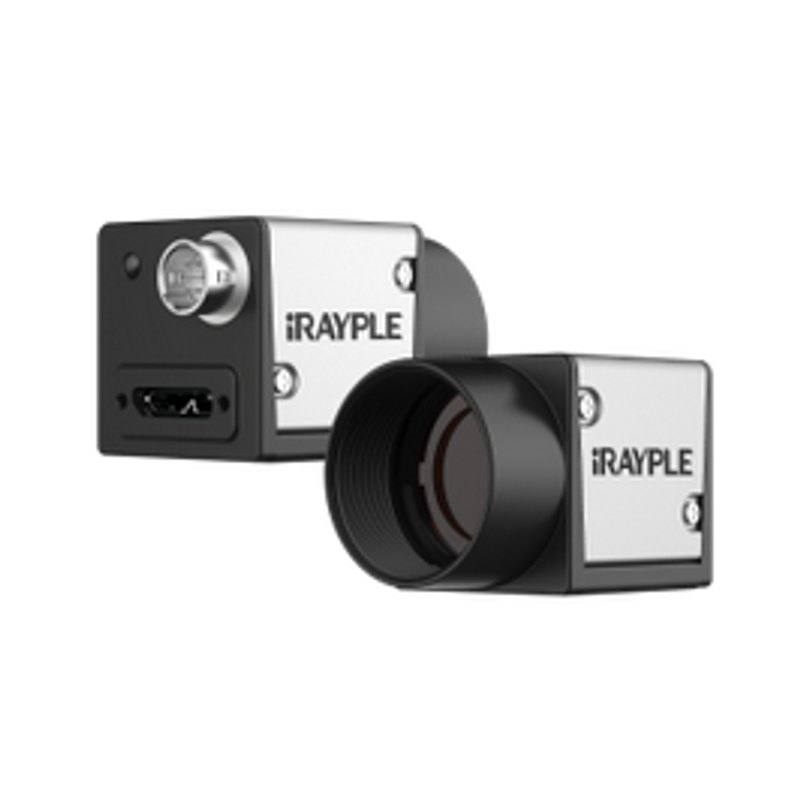
iRAYPLE A Series A5501 (5.3MP PYTHON5000 Area Scan)
A5501MG20E
The A5501 family uses a 1" onsemi PYTHON 5000 global-shutter CMOS sensor with 2592x2048 (5.3 MP) resolution, 4.8 µm square pixels and 10-bit output. GigE/PoE variants (A5501MG20E mono, A5501CG20E color) run at 20 fps over a 1 Gbps Gigabit Ethernet interface with a 256 MB on-board image buffer, while the USB3.0 (5 Gbps) color variant A5501CU60E reaches 60 fps with a 64 MB cache. All models offer C-mount, 1-32x gain, 60 dB WDR, software/hardware/free-run triggering and a 6-pin Hirose I/O, and conform to GigE Vision V2.0 or USB3 Vision plus GenICam. Power is PoE or 9-24 V DC (GigE) / USB-bus or 9-24 V DC (USB3) at roughly 3.8 W, with a -30 to +50 degC operating range and CE/FCC/RoHS compliance.
The iRAYPLE A5501 builds on the onsemi PYTHON 5000, a 1" global-shutter CMOS sensor delivering 2592 x 2048 (5.3 MP) at 4.8 micron square pixels with 10-bit output. The global shutter is the headline trait for an installer: it freezes the entire frame in one instant, so parts moving on a conveyor, on a rotary index, or under a robot are captured without the skew and smear a rolling shutter would introduce. That makes this camera a natural fit for triggered, motion-coupled inspection rather than static bench work. The 5.3 MP count over a 1" optical format and 4.8 micron pixels gives a sensible balance of detail and light sensitivity, with 60 dB WDR and 1-32x gain available to pull usable contrast out of high-dynamic-range scenes such as glossy metal next to dark backgrounds.
Interface choice is the main decision because the A5501 ships in three variants that share the sensor but differ in bandwidth and speed. The two GigE/PoE models (A5501MG20E mono, A5501CG20E color) run at 20 fps over a 1 Gbps Gigabit Ethernet link with a 256 MB on-board buffer and conform to GigE Vision V2.0 plus GenICam, while the USB3.0 color model (A5501CU60E) reaches 60 fps over a 5 Gbps link with a 64 MB cache under USB3 Vision plus GenICam. GigE gives you cable runs to roughly 100 m, PoE single-cable power, and clean multi-camera fan-out through a switch; USB3 trades reach for the higher frame rate when the host PC sits close to the camera. The generous 256 MB GigE buffer matters at speed, absorbing bursts so frames are not dropped when the network or host momentarily stalls.
Physically the camera is a compact 29 x 29 x 42 mm, 88 g C-mount body drawing about 3.8 W, powered by PoE or 9-24 V DC over the 6-pin Hirose on GigE variants, or by USB bus / 9-24 V DC on the USB3 model. The Hirose I/O and the software/hardware/free-run trigger modes are what let you synchronize exposure to an encoder, a photoeye, or a PLC and fire a strobe in lock-step, which is how you exploit the global shutter on a moving line. The C-mount and 1" format set your lens math: you need a lens whose image circle covers 1" and whose resolving power suits 4.8 micron pixels. A wide -30 to +50 degC operating range plus CE/FCC/RoHS compliance means it tolerates cold stores and warm enclosures, and the mono A5501MG20E specifically maximizes resolution and sensitivity for metrology, OCR/OCV, and surface defect tasks where color is not needed.
Best for
Motion-coupled defect and surface inspection on conveyors or indexers, where the global shutter freezes moving parts without smear at 5.3 MP
Dimensional measurement and metrology on the mono A5501MG20E, using full resolution and the 1" format for sharp edge detection
Industrial OCR/OCV reading of printed or marked characters on packaging, labels, and components
Multi-camera GigE/PoE inspection cells (A5501MG20E / A5501CG20E) needing single-cable power and runs up to ~100 m
Higher-throughput color inspection with the USB3 A5501CU60E at 60 fps where the host PC is close to the camera
Selection notes
Pick the variant by interface and speed before anything else: GigE/PoE at 20 fps with a 256 MB buffer and ~100 m reach (A5501MG20E mono, A5501CG20E color) versus USB3.0 at 60 fps with a 64 MB cache for short, fast, host-local links (A5501CU60E color).
Choose mono (A5501MG20E) for maximum resolution, sensitivity, and contrast in metrology, OCR/OCV, and surface defect work; choose color only when the inspection genuinely depends on hue.
Budget a C-mount lens with an image circle that covers the 1" sensor and resolving power matched to the 4.8 micron pixels, or fine edge and character detail will be optically limited regardless of the sensor.
Plan trigger and lighting around the global shutter: use the 6-pin Hirose I/O and software/hardware/free-run modes to sync exposure to an encoder or photoeye and strobe lighting in step with part motion.
Confirm power and network infrastructure: PoE or 9-24 V DC via Hirose for GigE, USB-bus or 9-24 V DC for USB3, ~3.8 W draw, and a GigE Vision V2.0 / USB3 Vision plus GenICam-compatible host stack.
Specifications: General
Brand
iRAYPLE
Camera type
Area scan
Specifications: Sensor
Resolution
5.3 MP (2592 x 2048)
Horizontal resolution
2592 x 2048 px
Mono / color
Mono (A5501MG20E) / Color (A5501CG20E, A5501CU60E)
Follow these steps to bring up your iRAYPLE camera, capture a first image, and move from the viewer to your own application. The flow is the same across the A, AE, AX and L series; only the physical interface differs.
Download and install the iRAYPLE machine-vision SDK together with its viewer client for your operating system. The installer provides the camera drivers, the GenTL producer, and the viewer you will use for first light. For GigE Vision models, also install or enable the bundled filter/performance driver on the network adapter to maximize throughput.
2. Connect the camera to the correct interface
Wire the camera to its matching host interface: a dedicated Gigabit (or 10 GigE) NIC for GigE Vision models, a USB3 Vision port with a quality cable for USB3 models, or a frame grabber for CoaXPress models. Power the camera (PoE, USB bus power, or PoCXP / external supply as applicable). For GigE Vision, put the NIC and camera on the same subnet and, where supported, enable jumbo frames.
3. Detect and open the camera in the viewer
Launch the iRAYPLE viewer, run device enumeration, and select your camera from the discovered list. Open it to load the device feature tree (GenICam node map). If a GigE camera is found but cannot be opened, correct the IP configuration so the camera and NIC are in the same address range.
4. Set exposure, gain and trigger, then grab a first image
Start with continuous (free-run) acquisition under stable lighting. Adjust exposure time and gain for a well-exposed, low-noise image, set the pixel format (e.g. Mono8 or a Bayer/RGB format), and tune white balance on color models. Once the live image looks correct, switch trigger mode to hardware or software trigger to synchronize capture with your process, and verify a single triggered frame.
5. Move from the viewer to the SDK or a GenICam library
With imaging confirmed, reproduce the same settings in code using the SDK's C/C++ or Python API: enumerate, open, configure the relevant GenICam features, register a frame callback or grab loop, and convert frames to your pipeline's buffer format. Since the cameras are GenICam/GenTL-compliant, you can alternatively drive them from a third-party GenICam vision library. From here a stable image stream can feed a deep-learning inspection step such as Rosepetal for automated quality control.
Frequently asked questions
It uses a global shutter on the onsemi PYTHON 5000 sensor, so the whole frame is exposed at once. That is why it suits parts moving on conveyors, indexers, or under a robot without motion smear.
All variants are 5.3 MP (2592 x 2048) on a 1" sensor with 4.8 micron pixels and 10-bit output. The GigE/PoE models run at 20 fps; the USB3.0 color model (A5501CU60E) runs at 60 fps.
GigE/PoE mono (A5501MG20E) and color (A5501CG20E) run at 1 Gbps with a 256 MB buffer and 20 fps, conforming to GigE Vision V2.0 + GenICam. The USB3.0 color model (A5501CU60E) runs at 5 Gbps with a 64 MB cache and 60 fps under USB3 Vision + GenICam.
It is a C-mount camera with a 1" CMOS sensor and 4.8 micron square pixels, so you need a C-mount lens whose image circle covers the 1" format and whose resolution matches the pixel pitch.
GigE variants accept PoE or 9-24 V DC via a 6-pin Hirose connector; the USB3 variant runs off USB bus power or 9-24 V DC. Power draw is about 3.8 W. It offers software, hardware, and free-run triggering through the Hirose I/O, with a -30 to +50 degC operating range.