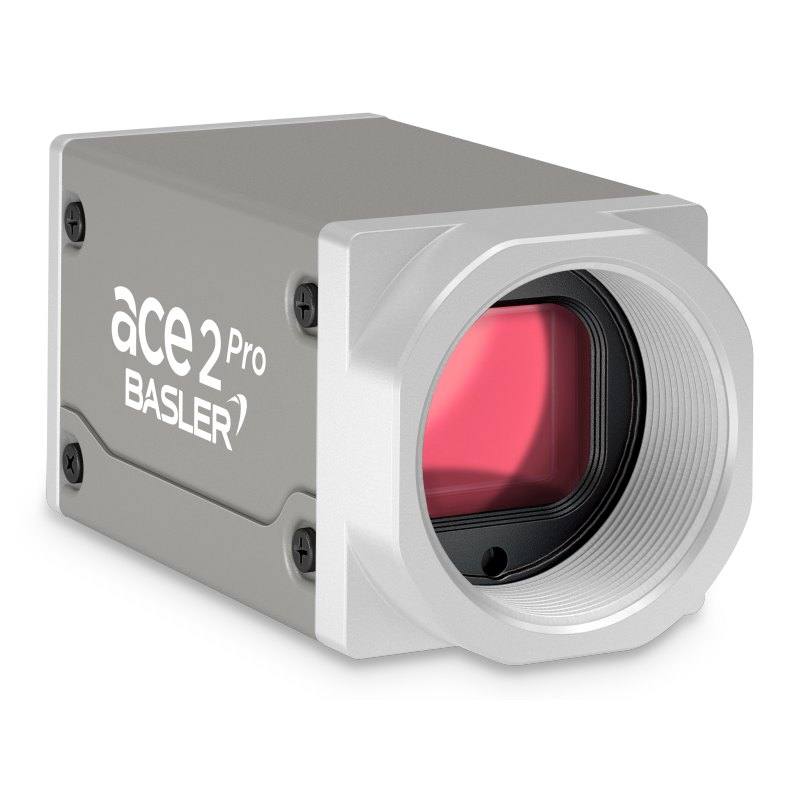
The Basler ace 2 a2A4096-9gc is part of the ace 2 GigE family, featuring the Sony IMX545 progressive scan CMOS sensor in a 1/1.1" format with 2.74 µm pixel pitch and global shutter. It outputs a default resolution of 4096 x 3000 pixels (12.3 MP) at up to 9.5 fps over standard Gigabit Ethernet, supporting both PoE (IEEE 802.3af) and 12–24 VDC power. The camera complies with GigE Vision 2.0 and GenICam standards, supports 8/10/12-bit pixel depth, and is available in BAS, PRO, and IP67 variants sharing the same core sensor and optics.
The Basler a2A4096-9gc pairs a Sony IMX545 Pregius S global shutter sensor with a 4096 x 3000 pixel (12.3 MP) array on a compact 1/1.1" (13.91 mm diagonal) format. The 2.74 µm pixel pitch delivers the resolution density the Pregius S sensor architecture is known for, providing improved quantum efficiency relative to earlier front-illuminated Pregius sensors — directly beneficial when cycle times or part reflectivity constrain available exposure time. Global shutter eliminates the rolling-shutter skew that would otherwise distort fast-moving parts, making this camera suitable wherever objects cannot be stopped for inspection or where a hardware trigger fires mid-motion. At up to 9.5 fps at full 12.3 MP resolution over Gigabit Ethernet, throughput is modest compared with USB3 Vision alternatives at comparable resolution, so this camera is best positioned for stations where network infrastructure is already in place and roughly 100 ms per-frame cadence is acceptable.
The GigE Vision 2.0 and GenICam-compliant interface means any standards-compliant SDK — Basler pylon, Halcon, VisionPro, or open-source alternatives — will enumerate and control the camera without vendor-specific drivers. PoE (IEEE 802.3af) simplifies cabling to a single Cat5e/Cat6 run up to 100 m, avoiding a separate 12–24 VDC feed at the camera head; both power modes are supported, so the same SKU can drop into either topology. Power draw is 4.2 W, low enough that a managed PoE switch can service a dense multi-camera array without budget constraints. Pixel depth is selectable at 8, 10, or 12 bits: 8-bit maximises bandwidth and compatible frame rate headroom; 12-bit preserves gradient information for AI-based defect scoring or precise colorimetric inspection where subtle tonal differences matter. The three hardware variants (BAS, PRO, IP67) share the same Sony IMX545 sensor and C-Mount optics, so optical qualification transfers across variants — the IP67 body simply adds sealing for washdown environments.
The C-Mount on a 1/1.1" sensor requires careful lens selection: only lenses with an image circle rated for 1/1.1" or larger will cover the full array without vignetting at the corners. At 2.74 µm pixel pitch, resolving power demands are high — a lens specified to resolve fine detail at this pitch avoids becoming the resolution bottleneck. Lighting pairing is straightforward: global shutter supports strobe illumination without banding, so a high-power ring or coaxial LED strobe synchronized via the camera's GPIO trigger line is the standard integration. The -10 to 60 °C operating range and 55.5 × 29 × 29 mm, sub-100 g housing allow mounting in tight conveyor brackets or gantry arms without thermal management concerns under most factory conditions.
Best for
High-resolution surface and cosmetic defect inspection on PCBs, pharmaceutical blister packs, or label stock where the 12.3 MP array captures fine-pitch features (solder bridges, pinholes, print defects) in a single shot without stitching
Packaging and label OCR/OCV where color fidelity at 12-bit depth aids character contrast and code-reading algorithms need dense pixel coverage across a wide label
Dimensional measurement and presence/absence verification on small-to-medium parts — global shutter freezes part position on a moving conveyor, and the 4096-pixel horizontal span provides sub-pixel gauging headroom when combined with a calibrated telecentric or distortion-corrected lens
Traceability and 2D code reading (DataMatrix, QR) on pharmaceutical and medical-device packaging where regulatory compliance requires high read rates on dense or low-contrast codes at line speed
Multi-camera GigE networks in automotive or electronics assembly lines where PoE simplifies installation in distributed stations and a common IP network fabric already exists
Selection notes
Frame rate ceiling: 9.5 fps at 12.3 MP over GigE is the hard throughput limit. If your line runs faster than roughly one part per 105 ms, consider ROI windowing to raise frame rate or evaluate a USB3 Vision or CoaXPress alternative at this resolution class.
Lens image circle: the 1/1.1" sensor diagonal (13.91 mm) exceeds common 2/3" C-Mount lenses; confirm the chosen lens is rated for 1/1" or 4/3" coverage to avoid corner softness and vignetting that would compromise measurement accuracy at the image periphery.
Color variant trade-offs: this is the color (Bayer) model — if your application is purely dimensional or the illumination is monochromatic, the monochrome sibling will deliver higher effective resolution per pixel (no demosaicing interpolation) and better low-light SNR; only specify the color variant when hue discrimination or color OCV is a genuine requirement.
PoE infrastructure: IEEE 802.3af delivers up to 15.4 W per port; the camera's 4.2 W draw is well within budget, but verify switch port count and total power budget when deploying arrays of four or more cameras on a single PoE switch.
IP rating: the standard BAS variant is rated IP30 — adequate for enclosed machine enclosures with no liquid ingress risk. If the station involves coolants, cleaning sprays, or condensation, specify the IP67 variant from the outset; retrofitting sealing in the field is not possible with the BAS body.
Specifications: General
Brand
Basler
Camera type
Area Scan
Specifications: Sensor
Resolution
12.3 MP
Horizontal resolution
4096 x 3000 px
Mono / color
Color
Sensor manufacturer
Sony Pregius S
Sensor model
Sony IMX545-AAQJ-C
Shutter
Global Shutter
Sensor size
1/1.1" (13.91 mm diagonal)
Pixel size
2.74 x 2.74 µm
Specifications: Performance
FPS
Up to 9.5 fps (8.4 fps default)
Specifications: Interface
Interface
GigE (GigE Vision 2.0, 100/1000 Mbit/s)
Protocols
GigE Vision 2.0, GenICam
Specifications: Optics
Mount
C-Mount
Specifications: Electrical
Power
PoE (IEEE 802.3af) or 12–24 VDC
Power consumption
4.2 W
Specifications: Environment
IP rating
IP30
Operating temperature
-10 to 60 °C
Specifications: Mechanical
Dimensions
55.5 x 29 x 29 mm
Weight
< 100 g (per docs) or ~100 g (per shop page)
Housing material
Box
Applications this camera is commonly selected for. Open one to see the full recommended hardware and approach.
Matched automatically by: lens mount fits the camera mount · lens image circle covers the camera sensor — this camera: C-Mount · 1/1.1" (13.91 mm diagonal) sensor.
By category
All 90C-mount lenses 66Telecentric lenses 24
By brand
All 90Basler 34iRAYPLE 26Omron / Sentech 24Datalogic / Datasensing 6
Get a first image quickly with the pylon Viewer, then move into the pylon SDK for your application. These cameras are GenICam/GenTL-compliant, so any compliant vision software can drive them as well.
Download and install the pylon Camera Software Suite for your OS from Basler. This provides the pylon Viewer, the GenTL transport-layer producers and the pylon SDK (C/C++/.NET/Python). On Windows the installer adds the needed drivers; on Linux follow the included setup notes for USB and network permissions.
2. Connect the camera and check the link
Cable the camera to its matching interface: GigE Vision to a GigE port (use a quality cable and, ideally, a dedicated NIC with jumbo frames enabled), USB3 Vision to a USB 3.x port with the supplied cable, or CoaXPress to the frame grabber. Provide power where required (PoE, USB bus power, or PoCXP). Open the pylon Viewer and confirm the camera appears in the device list; for GigE, make sure the camera and NIC are on the same subnet.
3. Grab a first image and set exposure, gain and pixel format
Select the camera in the pylon Viewer and start a continuous grab. Adjust exposure time and gain until the image is well exposed (avoid clipped highlights), set the pixel format (e.g. Mono8 or a Bayer/RGB format), and focus the lens. Use a test pattern if the lens or scene is not ready yet.
4. Configure triggering and acquisition
Decide between free-run and triggered acquisition. For synchronized capture, set the trigger source (software or a hardware line on the I/O connector), trigger mode and any debounce or exposure mode, then verify timing. Note the parameter names you change in the Viewer feature tree, as you will reuse them in code.
5. Move to the SDK or a GenICam-compliant library
Recreate your settings in code with the pylon SDK (C, C++, .NET or Python) to open the device, apply the same features and pull frames into your pipeline; pylon vTools and pylon AI can add processing blocks. Because the cameras are GenICam/GenTL standard, third-party vision libraries work too. Once the image stream is stable, you can route frames to a deep-learning inspection such as Rosepetal for automated defect detection.
Frequently asked questions
The camera delivers up to 9.5 fps at its full 4096 x 3000 resolution over GigE, with a default documented rate of 8.4 fps. Reducing the active ROI (fewer rows) increases the achievable frame rate, as the GigE bandwidth ceiling is the primary constraint.
Yes. Because all pixels integrate simultaneously with a global shutter, a hardware-triggered LED strobe fired on the camera's GPIO line freezes motion without the partial-frame banding that rolling shutter sensors produce. This is a key reason to choose this sensor architecture for conveyor-speed inspection.
The camera outputs 8, 10, or 12 bits per pixel. Use 8-bit when maximising frame rate headroom or when downstream processing is optimised for byte-aligned data. Choose 10 or 12-bit when the application requires fine tonal discrimination — AI-based surface scoring, colorimetric grading, or detecting subtle contrast differences in pharmaceutical coatings — and bandwidth or storage cost is acceptable.
Yes. The camera supports IEEE 802.3af Power over Ethernet at 4.2 W, well within the 15.4 W per-port budget of 802.3af switches. A single Cat5e or Cat6 cable up to 100 m carries both data and power. If PoE infrastructure is unavailable, a 12–24 VDC supply via the I/O connector is equally supported.
Yes. Compliance with GigE Vision 2.0 and GenICam means the camera is recognised and fully controllable by any standard-compliant SDK including Basler pylon, MVTec Halcon, Cognex VisionPro, National Instruments Vision, and open-source libraries such as OpenCV's GStreamer or aravis backends. No proprietary driver is required.