Datasensing LENS-50-FM-M52 x0.75 — 50 mm Large Format F-Mount Lens
LENS-50-FM-M52 x0.75
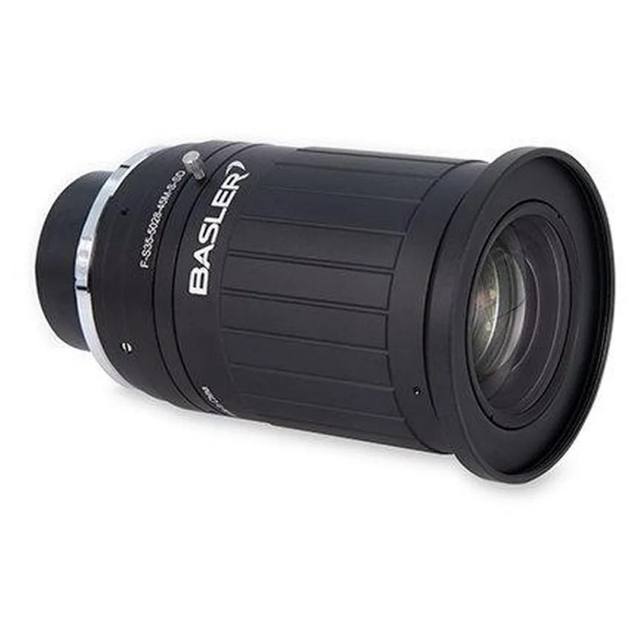
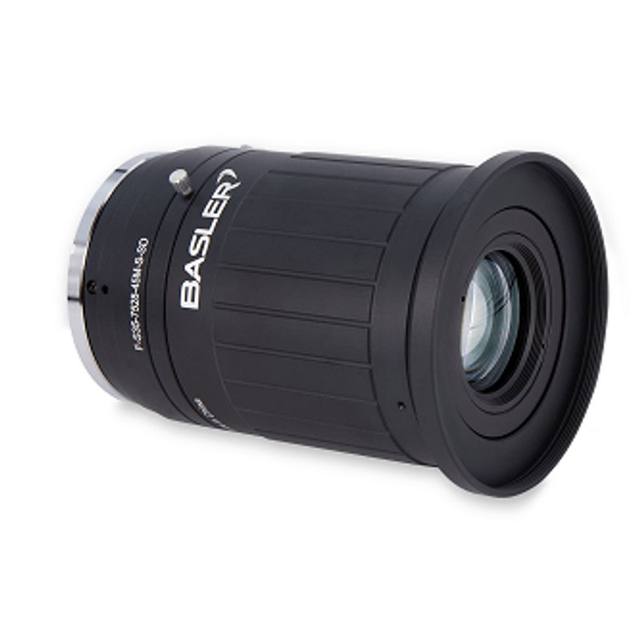
The Datasensing LENS-50-FM-M52 x0.75 (OEM: Navitar 1-19713) is a large-format fixed focal length lens designed for full-frame sensors up to 43.3 mm diagonal, making it compatible with high-resolution 11 MP and 16 MP sensors. It offers an aperture range of F2.8 to F16 and delivers 200 lp/mm center resolution, dropping to 63 lp/mm at the edge. The lens uses an F-Mount bayonet interface, accepts M52x0.75 screw-in filters, and has a minimum object distance of 0.26 m. Physical dimensions are 57.5 mm diameter by 77 mm length, with manual focus and iris control.
The Datasensing LENS-50-FM-M52 x0.75 is a 50 mm fixed focal length, large-format machine vision lens built around an F-Mount bayonet interface and engineered to cover a 43.3 mm image circle — the diagonal of a full 35 mm frame. That image circle is the defining design choice: it means the lens will fully illuminate even the largest currently available industrial sensors in the 11 MP and 16 MP class without vignetting or corner fall-off, giving installers the freedom to pair it with high-pixel-count area-scan cameras and exploit every pixel. The aperture range of F2.8 to F16 provides meaningful control over depth of field and exposure. Opening to F2.8 maximises light collection for dimmer scenes or shorter exposure times, while stopping down toward F16 progressively improves edge sharpness and extends the depth of focus — useful when parts have height variation across the field.
Optical resolution is specified at 200 line-pairs per millimetre at the centre, falling to 63 lp/mm at the image edge. On a high-resolution sensor with fine pixel pitch — typical of 16 MP large-format cameras — centre resolution is well above the Nyquist limit of the sensor, meaning the lens is not the resolving bottleneck for most tasks. Edge resolution at 63 lp/mm constrains how fine a feature can be reliably resolved toward the corners of a large sensor at full aperture; stopping down one or two stops will tighten the edge MTF and is advisable for critical dimensional work near field edges. The minimum object distance (M.O.D.) is 260 mm, so at typical working distances of 300–600 mm and with a 50 mm focal length, the resulting field of view on a large-format sensor spans roughly 40–90 mm along the short axis — well suited to medium-sized part inspection without relay optics or extension tubes.
Mechanically, the lens is 57.5 mm in diameter and 77 mm long, with manual focus and iris rings. The M52 x 0.75 filter thread accommodates standard 52 mm screw-in optical filters — polarisers, bandpass, or neutral-density — which are commonly combined with structured or coaxial illumination rigs in surface and dimensional inspection cells. The F-Mount interface is a proven bayonet standard compatible with dedicated F-Mount camera bodies from multiple vision manufacturers. Because the mount is a bayonet rather than a C or CS thread, it is mechanically rigid under vibration and allows fast, repeatable lens swaps on the production floor without losing focus registration.
Best for
High-resolution area-scan inspection on 11 MP or 16 MP large-format sensors where the full sensor area must be illuminated without corner vignetting
Dimensional measurement of medium-sized parts (roughly 40–90 mm field width at 300–600 mm working distance) requiring the centre MTF advantage of a 200 lp/mm lens
Surface inspection of panels, metal sheets, or packaging blanks where a wide field and fine spatial resolution are needed simultaneously
PCB or electronics assembly verification using a high-pixel-count F-Mount camera, where filter thread access (M52 x 0.75) allows polarisation or bandpass filtering to suppress glare or enhance contrast
Automotive or semiconductor part traceability and OCR/OCV tasks on large components where a single high-resolution frame must capture a wide area at moderate working distance
Selection notes
Sensor compatibility: the 43.3 mm image circle covers full-frame large-format sensors, but verify your camera's sensor diagonal does not exceed 43.3 mm; APS-C and 4/3" sensors will work with no vignetting and gain some corner-MTF benefit from using only the sharper centre zone of the lens
Edge resolution trade-off: centre MTF is 200 lp/mm but edge drops to 63 lp/mm — for metrology or inspection tasks where defects or features can appear near the sensor corners, stop the aperture down to F5.6–F8 and verify edge sharpness empirically at your chosen working distance before committing to a field layout
Working distance floor: the 260 mm M.O.D. is the hard limit; installations with mechanical clearances under 260 mm cannot use this lens without extension tubes, which will also shift the working distance range and require refocusing
Filter and lighting integration: the M52 x 0.75 filter thread is a design asset — plan for it in the optical path budget; if combining with a coaxial or structured-light illuminator, confirm the illuminator beam clears the 57.5 mm lens barrel diameter
F-Mount camera selection: confirm the vision camera in your BOM has a true F-Mount body (not an F-to-C adapter stack); adapter stacks add back-focus uncertainty and mechanical compliance that degrades high-resolution performance at the pixel level
Specifications: General
Brand
Datalogic / Datasensing
Specifications: Optical
Focal length
50 mm
Lens mount
F-Mount
Aperture (f-number)
F2.8–F16
Image circle / max sensor
43.3 mm (large format)
Working distance
260 mm (M.O.D.)
Applications this camera is commonly selected for. Open one to see the full recommended hardware and approach.
Matched automatically by: camera mount fits the lens mount · camera sensor is covered by the lens image circle — this lens: F-Mount · 43.3 mm (large format) image circle.
1. Install the IMPACT Software Suite and connect the camera
Install the IMPACT Software Suite on your PC, which provides both the configuration/viewer tools and the SDK. For a GigE Vision model (E100, M or U series), connect it to a dedicated NIC and, for USB3 models, use a certified USB3 cable and port. Power the camera and confirm it enumerates.
2. Bring the camera online and verify the link
For GigE Vision, put the camera and the host NIC on the same subnet (a static IP on the camera matching the NIC range is the most reliable starting point); for USB3, confirm the device is recognized. Open the IMPACT viewer/device tool, discover the camera, and verify a stable connection before streaming. Enabling jumbo frames on the NIC helps GigE throughput.
3. Set exposure, gain and trigger, then grab a first image
In the IMPACT tools, start a live stream and adjust exposure and gain until the image is well-lit without saturation; set white balance on color models. Begin in free-run (continuous) mode to confirm imaging, then switch to hardware or software trigger as your application requires. Capture and save a reference image once the scene looks correct.
4. Build a vision tool or move to the SDK/API
Use the IMPACT point-and-click vision tools to assemble an inspection, or use the IMPACT SDK to access the camera and results programmatically and feed them into your HMI/PLC application. As these are GenICam/GenTL-compliant devices, you can alternatively drive them from any GenICam-compliant third-party vision library if your pipeline standardizes on one.
5. Route the stable feed to deep-learning inspection (optional)
Once you have a stable, repeatable image, the feed can be sent to a deep-learning inspection platform such as Rosepetal for defect detection or classification tasks that go beyond rule-based tooling. Keep lighting, optics and trigger timing fixed so the images reaching the model stay consistent.
Frequently asked questions
The lens covers a 43.3 mm image circle, which matches the diagonal of a full 35 mm frame sensor. It is compatible with 11 MP and 16 MP large-format industrial sensors without vignetting. Smaller sensors — APS-C, 4/3", or 1" formats — are fully covered and will actually benefit from the higher-MTF centre zone of the image circle.
The minimum object distance is 260 mm. At practical working distances of 300–600 mm the field of view on a large-format sensor will span approximately 40–90 mm along the short axis. Exact field size depends on your camera's sensor dimensions — use the standard FOV formula: FOV = sensor size × (working distance / focal length).
Centre resolution is 200 lp/mm. Edge resolution drops to 63 lp/mm. For applications where defects or measurement targets appear near the field edges, stopping the aperture down from F2.8 to F5.6 or F8 will improve corner sharpness. For critical dimensional gauging near field edges, validate MTF at your actual aperture and working distance.
Yes. The lens has an M52 x 0.75 filter thread at the front, which accepts standard 52 mm screw-in filters including polarisers, bandpass filters, and neutral-density filters. This is useful for suppressing specular reflections on metallic or glossy surfaces or for selecting a specific illumination wavelength.
The lens uses an F-Mount bayonet interface. Cameras with a native F-Mount body accept this lens directly. If your camera has a C-Mount or other mount, an F-to-C adapter can be used but is not recommended for high-resolution work due to added back-focus tolerance and mechanical play.