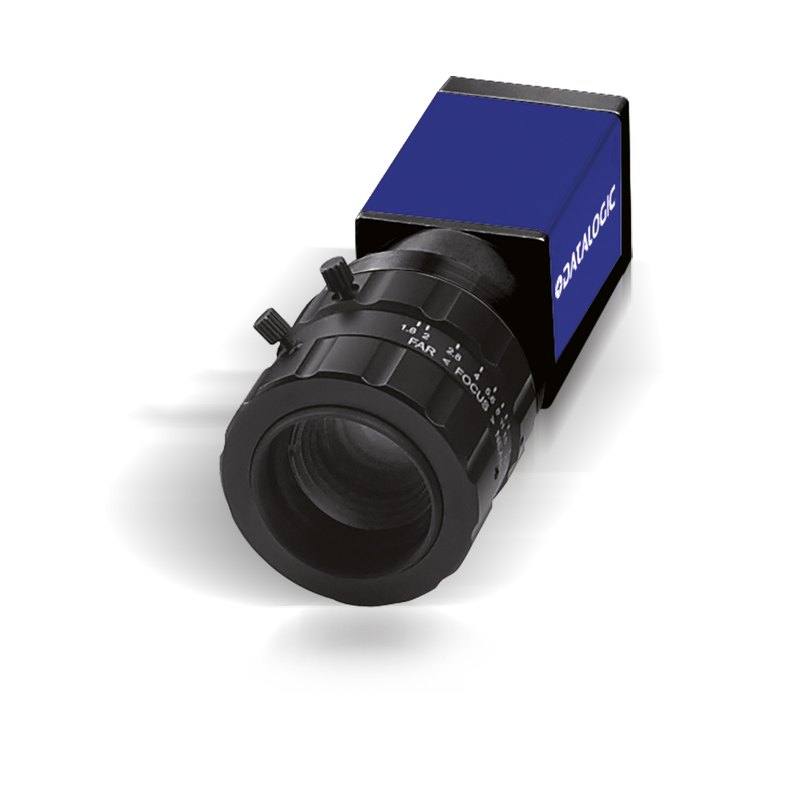
GigE Vision area scan camera with 1600 x 1200 (1.9 MP) resolution, 1/1.8" global shutter CMOS sensor (4.5 um pixel) and 60 fps. C-mount, Power over Ethernet or 12 VDC, with trigger and strobe I/O. Part of the Datasensing E100 Series.
The Datasensing E182 (CAM-E182-GE) is a monochrome area scan camera built around a 1/1.8-inch global shutter sensor with a 4.5 um pixel and 1.9 MP resolution (1600 px wide), running at up to 60 fps. As an area scan device it captures a full two-dimensional frame in a single exposure, which makes it straightforward to deploy on conveyors, indexing tables and pick-and-place stations where each part is imaged as a discrete snapshot rather than reconstructed line by line. The monochrome sensor dedicates every pixel to luminance rather than splitting it across a colour filter array, so it delivers higher effective spatial detail and light sensitivity than an equivalent colour part, which is the usual preference for measurement, defect detection and text-reading tasks where colour is not the discriminating feature.
The global shutter is the defining characteristic for motion-tolerant imaging: every pixel starts and stops integrating light at the same instant, so fast-moving parts are captured without the skew or smear that a rolling shutter introduces. Combined with the 60 fps frame rate, this allows the camera to freeze objects in motion and keep pace with reasonably quick production lines, while the global exposure keeps edges and features geometrically faithful for downstream gauging and pattern matching. The 4.5 um pixel on a 1/1.8-inch format strikes a practical balance between resolution and light-gathering area, giving usable sensitivity without resorting to very large, expensive optics.
Connectivity is over GigE Vision with GenICam compliance, a standardised machine-vision transport and parameter model that works with essentially any compliant acquisition library or vision software, simplifying integration and long-term maintenance. The interface runs over standard Ethernet cabling with comparatively long reach, and the camera supports Power over Ethernet so a single cable can carry both data and power. The C-mount provides access to a broad ecosystem of industrial lenses. The camera is also flagged as Rosepetal-ready, meaning it is intended to integrate directly with the Rosepetal AI vision platform for deep-learning inspection workflows.
Best for
AI-based surface and defect inspection on moving or indexed parts, where the global shutter preserves edge fidelity for deep-learning models
Industrial OCR/OCV: reading printed or marked codes, lot numbers and date codes where monochrome contrast and global-shutter clarity aid character recognition
Packaging inspection such as label presence, print quality and seal verification on production lines running at moderate speed
Inline inspection on conveyors and indexing tables where each part is imaged as a discrete frame at up to 60 fps
General-purpose 2D measurement and gauging where geometric accuracy on moving parts is required
Multi-camera networked installations where PoE and GigE cabling simplify distribution across a machine or cell
Selection notes
Lens selection: pair with a C-mount lens whose image circle covers the 1/1.8-inch sensor and whose resolving power suits the 4.5 um pixel; choose focal length from the required working distance and field of view rather than resolution alone.
Lighting: as a monochrome camera it has no colour discrimination, so choose illumination wavelength and geometry (bright field, dark field, dome, backlight) to maximise the contrast of the feature of interest; adequate light also lets you keep exposure short enough to exploit the global shutter on fast-moving parts.
Cabling and power: GigE supports longer cable runs than many alternatives, and PoE lets a single Ethernet cable carry data and power, which simplifies wiring; ensure switches or injectors supply sufficient PoE and budget bandwidth on the network for the data rate.
Triggering and synchronisation: where the application requires it, synchronising acquisition to part position and firing lighting in time with exposure helps lock captures to the line; verify the camera's I/O and triggering capabilities against your requirements, as these support repeatable, motion-free captures.
When to choose differently: if you need very high resolution for fine-feature inspection, faster frame rates for high-speed lines, colour discrimination, or continuous-web imaging, consider a higher-resolution model, a higher-speed interface, a colour variant, or a line scan camera respectively.
Specifications: General
Camera type
Area scan
Specifications: Sensor
Resolution
1.9 MP
Horizontal resolution
1600 px
Mono / color
Monochrome
Shutter
Global shutter
Sensor size
1/1.8"
Pixel size
4.5 µm
Specifications: Performance
FPS
60 fps
Specifications: Interface
Interface
GigE Vision, PoE
Protocols
GigE Vision, GenICam
Specifications: Optics
Mount
C-mount
Specifications: Electrical
Power
PoE
Specifications: Commercial
Rosepetal-ready
Yes
This product groups every purchasable order code that shares the same sensing method, range and output. Cable length, connector type and operation mode (Light-ON/Dark-ON, NO/NC) vary by order code below.
Family variants with highlighted differences
Model
Mono / color
Interface
Availability
1.9 MP Monochrome GigE Vision Base
Monochrome
GigE Vision
On request
Applications this camera is commonly selected for. Open one to see the full recommended hardware and approach.
1. Install the IMPACT Software Suite and connect the camera
Install the IMPACT Software Suite on your PC, which provides both the configuration/viewer tools and the SDK. For a GigE Vision model (E100, M or U series), connect it to a dedicated NIC and, for USB3 models, use a certified USB3 cable and port. Power the camera and confirm it enumerates.
2. Bring the camera online and verify the link
For GigE Vision, put the camera and the host NIC on the same subnet (a static IP on the camera matching the NIC range is the most reliable starting point); for USB3, confirm the device is recognized. Open the IMPACT viewer/device tool, discover the camera, and verify a stable connection before streaming. Enabling jumbo frames on the NIC helps GigE throughput.
3. Set exposure, gain and trigger, then grab a first image
In the IMPACT tools, start a live stream and adjust exposure and gain until the image is well-lit without saturation; set white balance on color models. Begin in free-run (continuous) mode to confirm imaging, then switch to hardware or software trigger as your application requires. Capture and save a reference image once the scene looks correct.
4. Build a vision tool or move to the SDK/API
Use the IMPACT point-and-click vision tools to assemble an inspection, or use the IMPACT SDK to access the camera and results programmatically and feed them into your HMI/PLC application. As these are GenICam/GenTL-compliant devices, you can alternatively drive them from any GenICam-compliant third-party vision library if your pipeline standardizes on one.
5. Route the stable feed to deep-learning inspection (optional)
Once you have a stable, repeatable image, the feed can be sent to a deep-learning inspection platform such as Rosepetal for defect detection or classification tasks that go beyond rule-based tooling. Keep lighting, optics and trigger timing fixed so the images reaching the model stay consistent.
Frequently asked questions
Yes. It uses a global shutter sensor, so all pixels are exposed simultaneously. This freezes motion without the skew or smear of a rolling shutter, making it well suited to inspecting moving or indexed parts.
It is a GigE Vision camera with GenICam support, running over standard Ethernet cabling. It can be powered over the same cable via Power over Ethernet, so a single Ethernet run can carry both data and power.
It is monochrome. Every pixel captures luminance, giving higher effective detail and light sensitivity than an equivalent colour sensor, which is typically preferred for defect detection, measurement and text/code reading.
It provides 1.9 MP resolution (1600 px horizontally) on a 1/1.8-inch sensor with a 4.5 um pixel, and runs at up to 60 fps, suitable for moderate-speed inline inspection.
It uses a C-mount, giving access to a wide range of industrial lenses. Because it is GigE Vision and GenICam compliant, it works with standard machine-vision acquisition libraries and software, and it is also Rosepetal-ready for integration with the Rosepetal AI vision platform.