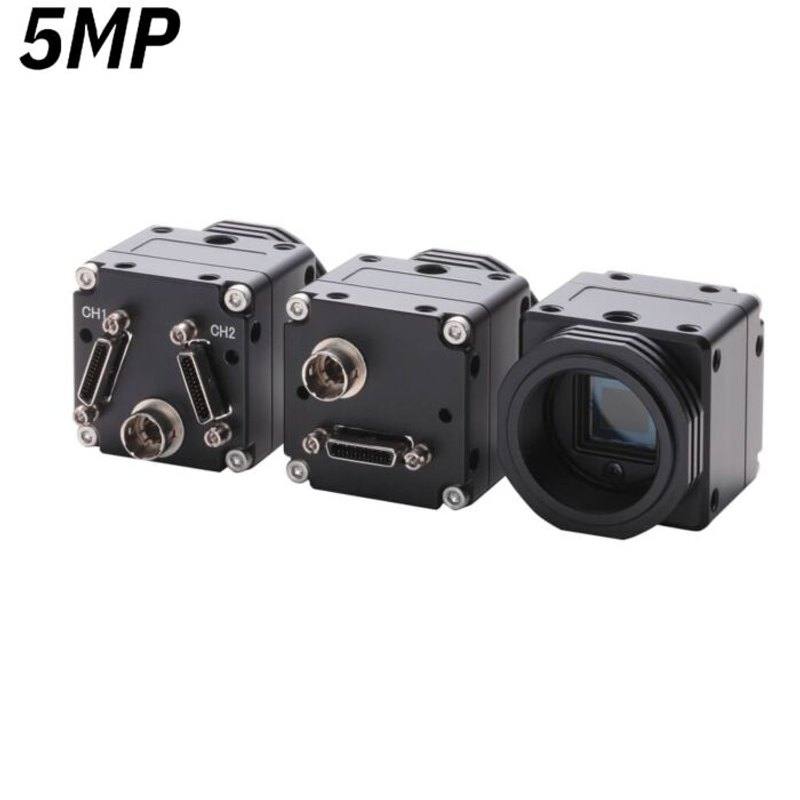
Omron / Sentech Sentech STC-SPB500PCL / STC-SPC500PCL Camera Link 5MP Camera
STC-SPB500PCL
The STC-SPB500PCL and STC-SPC500PCL are 5MP (2448 x 2048 pixel) Camera Link area scan cameras from Omron Sentech, based on the Sony IMX264 Pregius CMOS sensor in a 2/3" format with 3.45 µm pixel pitch. Both models offer a global shutter for distortion-free capture of moving objects, with output via Camera Link Base configuration supporting 3-TAP (35.7 fps) or 2-TAP (32.8 fps) modes and 8/10/12-bit data depth. The SPB500PCL is monochrome and the SPC500PCL is color; both support PoCL (Power over Camera Link), eliminating the need for a separate power supply, and are housed in a compact 35 x 35 x 40.7 mm aluminum body weighing approximately 69 g.
The STC-SPB500PCL (monochrome) and STC-SPC500PCL (color) are 5-megapixel area-scan cameras built around the Sony IMX264 Pregius CMOS sensor in a 2/3-inch format with 3.45 µm pixels arranged in a 2448 × 2048 array. The IMX264 is a well-proven global-shutter device: the entire pixel array exposes simultaneously, so there is zero row-to-row timing skew even when the part under inspection is moving on a conveyor or being handled by a robot arm. At 5 MP, the field of view can be kept wide enough to cover a complete product face while still resolving fine detail, making the camera well suited to defect detection, code reading, and dimensional gauging across a range of inspection distances. The 3.45 µm pixel pitch is compact enough to keep the physical sensor — and therefore the camera body — small, but not so small that read-noise penalties become an issue for low-contrast applications under controlled lighting.
The camera exports images over Camera Link Base in either 3-TAP mode at 35.7 fps or 2-TAP mode at 32.8 fps, with selectable bit depths of 8, 10, or 12 bits per pixel. Camera Link Base requires a dedicated frame-grabber card in the host PC; in return it delivers deterministic, low-latency transfer with no protocol overhead. PoCL (Power over Camera Link) support means the single Camera Link cable carries both image data and the DC 12 V ±10% supply, eliminating the need for a separate power cable at the camera head — a real advantage when routing cables through cable chains or conduits in tight machine layouts. At 2.1 W total consumption the camera generates very little heat, which matters in thermally controlled enclosures or when mounting cameras in arrays. The aluminum housing measures just 35 × 35 × 40.7 mm and weighs 69 g, making it easy to integrate into compact inspection heads or multi-camera gantries.
The C-Mount lens interface is universal, and the 2/3-inch sensor circle is satisfied by any lens rated for that format or larger. For high-accuracy dimensional measurement, a 2/3-inch telecentric lens can be paired directly without a reducer. Operating temperature spans 0 to 45 °C, placing it squarely in the typical factory-floor envelope without requiring active cooling. Because both mono and color variants share the same physical housing and interface, a system can be designed with identical mechanical and electrical installation while selecting the variant that best suits the inspection task — monochrome for maximum sensitivity and contrast under monochromatic LED illumination, color for applications that must distinguish surface markings, label print color, or color-coded components.
Best for
High-resolution surface and cosmetic defect inspection on automotive body panels, electronic PCBs, or pharmaceutical blister packs where global shutter prevents motion blur and 5 MP resolution provides sufficient detail across a full-width field of view.
Industrial OCR and OCV on product labels or direct-part marks, where the 2448 × 2048 pixel array resolves small fonts and 2D codes across a wide label without requiring the camera to be positioned uncomfortably close to the part.
Dimensional gauging and geometric measurement tasks where sub-pixel accuracy is required — the Sony IMX264 Pregius sensor's low noise supports edge-finding algorithms, and the camera can be paired with a 2/3-inch telecentric lens directly via C-Mount.
Robot guidance and pick-and-place alignment, where the global shutter freezes robot motion without image distortion and the compact 35 × 35 mm footprint fits inside end-of-arm tooling or above a conveyor gap.
Multi-camera inline traceability stations in semiconductor or electronics assembly, where PoCL simplifies cabling per head and the deterministic Camera Link interface integrates cleanly with existing frame-grabber-based machine controllers.
Selection notes
Camera Link Base requires a frame-grabber card in the host PC — confirm your PC has a PCIe slot and that you have sourced a compatible Base-configuration grabber before committing to this interface. If your system is already built around GigE Vision or USB3 Vision, consider whether switching interface families is justified by the determinism and bandwidth that Camera Link provides.
PoCL simplifies installation but only works when the frame-grabber or repeater explicitly supports PoCL; verify your grabber's PoCL capability. If PoCL is not available on your grabber, the camera can still be powered by an external DC 12 V ±10% supply — plan for the additional cable.
The 2/3-inch sensor format is larger than smaller formats common on lower-resolution cameras. Lenses must be rated for 2/3 inch or larger; using a smaller-format lens will cause vignetting at the corners. Check the lens datasheet's image circle specification before purchasing.
Choose between the SPB500PCL (monochrome) and SPC500PCL (color) based on the inspection task, not simply convenience. Monochrome provides higher sensitivity under the same illumination and is preferred for defect detection, edge measurement, and code reading under structured LED lighting. Color is necessary only when hue discrimination is part of the pass/fail decision.
At 35.7 fps maximum in 3-TAP mode, the camera suits most inline inspection rates — but if your line runs faster than approximately 35 parts per second in a one-part-one-shot configuration, you will need to budget for strobe illumination with very short exposure times to freeze motion rather than relying on frame rate alone to separate parts.
Specifications: General
Brand
Omron / Sentech
Camera type
Area Scan
Specifications: Sensor
Resolution
5.0 MP
Horizontal resolution
2448 px
Mono / color
Mono (SPB500PCL) / Color (SPC500PCL)
Sensor manufacturer
Sony Pregius
Sensor model
Sony IMX264
Shutter
Global Shutter
Sensor size
2/3 inch
Pixel size
3.45 µm
Specifications: Performance
FPS
35.7 fps (3-TAP), 32.8 fps (2-TAP)
Specifications: Interface
Interface
Camera Link (Base, PoCL)
Specifications: Optics
Mount
C-Mount
Specifications: Electrical
Power
DC 12V ±10% (PoCL compatible)
Power consumption
2.1 W
Specifications: Environment
Operating temperature
0 to 45 °C
Specifications: Mechanical
Dimensions
35 x 35 x 40.7 mm
Weight
69 g
Applications this camera is commonly selected for. Open one to see the full recommended hardware and approach.
These steps take an Omron Sentech (STC) camera from the box to a stable first image and on to your own application. They apply across the GigE Vision, USB3 Vision and CoaXPress STC families; the interface only changes how you cable and power the camera.
Download and install the Sentech SDK on the host PC. The package provides StViewer, the viewing and configuration software you use to bring the camera up, and StApi, the programming SDK you integrate later. Because the cameras are GenICam/GenTL-compliant, StApi also registers a GenTL producer, so any GenICam-compliant third-party vision software can discover and drive the camera as an alternative front end.
2. Cable, power and connect the camera
Connect according to the interface. GigE Vision: link to a Gigabit NIC (use PoE or the separate power input) and put the camera and host on the same subnet; for USB3 Vision use a USB 3.x port and a certified cable; for CoaXPress (STC) connect to a CoaXPress frame grabber, which also supplies Power-over-Coax. Then open StViewer and let it enumerate the camera. If a GigE camera does not appear, check the IP configuration and firewall, and on USB3 confirm the host bandwidth and driver.
3. Configure exposure, gain and white balance
Open the device in StViewer and start a live stream. Set exposure and gain for a well-exposed, low-noise image: raise exposure first and only add gain when more light or a faster shutter is not an option, keeping exposure short enough to freeze motion on global-shutter models. On colour cameras, run white balance under your actual production lighting. Adjust the lens aperture and focus on a representative target before tuning anything else.
4. Set the trigger and grab a first image
Start in free-run (continuous) acquisition to confirm a clean, stable image. For inline inspection switch to hardware or software triggering: select the trigger source, set the active edge and any delay, and wire the strobe or illumination to the camera's I/O so lighting fires with each exposure. Acquire and save a frame in StViewer; this saved image is your reference for the SDK stage and for downstream inspection.
5. Move to the StApi SDK (or any GenICam software)
Once the image is stable, reproduce the same settings in code. Use StApi to open the device, apply the GenICam features you validated in StViewer (exposure, gain, trigger, pixel format) and grab frames into your application via the bundled C++, C, C#/.NET or Python interfaces; the included samples are the fastest starting point. Prefer a different stack? The same GenICam/GenTL camera works with third-party vision libraries. With a reliable feed, you can route it into a deep-learning inspection such as Rosepetal for AI-based defect detection.
Frequently asked questions
The camera reaches 35.7 fps in 3-TAP Camera Link Base mode and 32.8 fps in 2-TAP mode. Both modes deliver the full 2448 × 2048 pixel image at the same bit depth (8, 10, or 12 bits selectable); the TAP count affects only how many parallel data lanes are used to transfer the image across the Camera Link cable, not the sensor readout quality or the pixel data itself.
PoCL uses the standard Camera Link cable — no special cable is required. The power is carried on reserved pins within the Camera Link connector. You do not need a different cable, but your frame-grabber or repeater at the other end must support PoCL on those pins; if it does not, simply power the camera via an external DC 12 V ±10% supply instead.
No. The STC-SPB500PCL / STC-SPC500PCL uses a 2/3-inch sensor, which has a larger image circle than many smaller-format sensors. Lenses designed for smaller formats will vignette — the corners of the image will be dark or blurred. You must use lenses rated for 2/3 inch or larger.
The Sony IMX264 Pregius uses a true simultaneous global electronic shutter: all pixels integrate charge at exactly the same time. This eliminates the row-to-row skew of rolling shutters, so moving parts, vibrating surfaces, or robot-mounted camera setups produce geometrically correct images without the diagonal-smear or jello artifacts seen with rolling-shutter sensors.
The operating temperature is 0 to 45 °C. The specifications do not list an IP ingress-protection rating, which means the camera is not rated for exposure to water spray, coolant mist, or heavy dust. For harsh environments, the camera should be housed in an appropriately rated enclosure with a protective window in front of the lens.