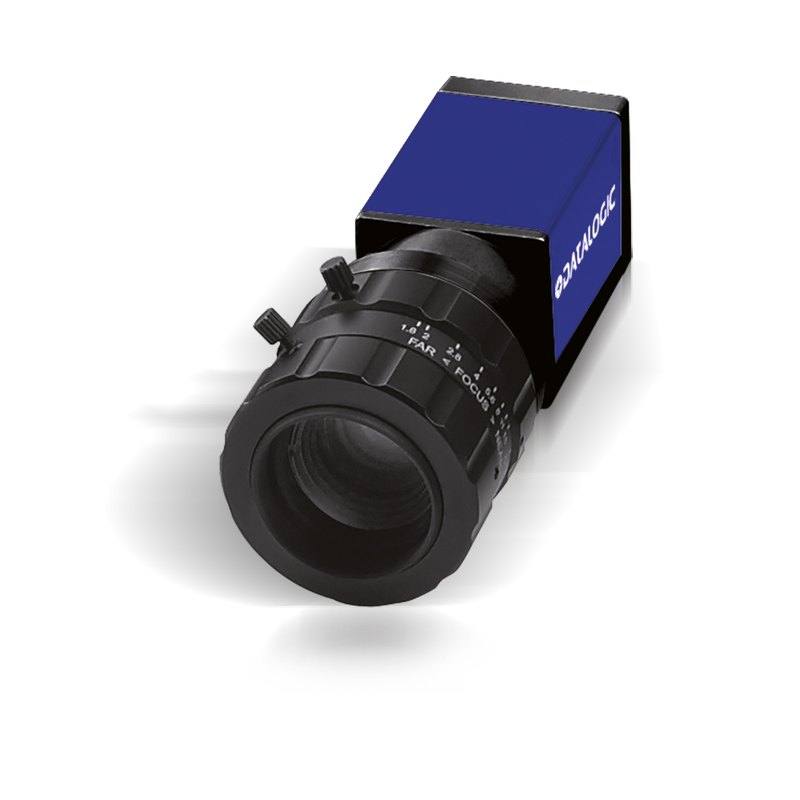
Datasensing M190C GigE Area Scan Camera (2048x1088, 50 FPS, Color)
CAM-M190C-GE-2048x1088-50
The CAM-M190C-GE-2048x1088-50 (P/N 601-0455) is a GigE Vision area scan camera from Datasensing (Datalogic group) delivering 2048x1088 (2.2 MP) color imaging at 50 full-resolution frames per second with a 2/3" global shutter CMOS sensor (11.26 mm H x 5.98 mm V active area) and 5.5 x 5.5 µm pixel pitch. The camera features a compact 42x29x29 mm aluminum housing rated IP30 and draws power exclusively from PoE (802.3af) or an optional 12 VDC supply, with a C-mount lens interface and hardware trigger/strobe I/O. It is designed for integration with Datasensing MX-E and MX-G vision processors running Impact software (v10.5.0+) or any GigE Vision–compliant host.
The Datasensing M190C pairs a 2/3" global shutter CMOS sensor with a 2048x1088 pixel array (2.2 MP) and a 5.5 µm pixel pitch to deliver 50 full-resolution color frames per second over GigE Vision. The global shutter is the defining characteristic for motion-sensitive work: every pixel integrates simultaneously, so fast-moving parts on a conveyor or a robot arm appear free of the rolling-shutter skew that distorts geometry and confuses pattern-match tools. At 50 fps the camera can comfortably handle lines running at high throughput rates, and the hardware trigger/strobe I/O lets installers lock image acquisition to an encoder or proximity sensor. The 2/3" sensor format with its 11.26 mm × 5.98 mm active area accepts the broad range of C-mount optics made for 2/3" coverage, giving integrators access to many standard focal lengths without vignetting concerns.
Color imaging at 2.2 MP means the camera resolves both fine spatial detail and chromatic differences in the same frame — a significant advantage for tasks such as label verification, color-code sorting, and surface blemish detection where a monochrome sensor would require ancillary color filters or multiple passes. The 5.5 µm pixel pitch offers a good balance between light sensitivity and spatial resolution: larger pixels collect more photons than the sub-4 µm designs common on higher-megapixel sensors, which translates to usable signal at shorter exposure times and reduces the strobe power budget. The operating temperature range of 0 to +50°C covers most indoor factory environments. The IP30 enclosure is not sealed against fluids or heavy particulate, so installations near wash-down zones or heavy grinding debris will require a protective housing.
Cabling and power logistics are simplified by PoE (802.3af) support: a single Cat 5e/6 cable carries both data and power, eliminating a separate power run to each camera head. An optional 12 VDC supply is equally supported for installations that already have a DC power rail. The 42 × 29 × 29 mm aluminum body and 90 g mass make it straightforward to mount in tight spaces — on a robot wrist, inside a multi-camera gantry, or above a narrow inspection lane — without significant structural reinforcement. The camera ships ready to connect to Datasensing MX-E and MX-G vision processors running Impact software v10.5.0 or later, and it also operates as a standard GigE Vision / GenICam device with any compliant host PC or third-party vision software, so it is not locked to a proprietary ecosystem.
Best for
Packaging line label and color verification where 50 fps throughput, color fidelity, and global shutter combine to catch misprints, wrong label colors, or missing lot codes on moving cartons without motion blur.
Automotive and electronics component traceability — reading 2D matrix codes, barcodes, and OCR text on parts at production speed, leveraging the 2.2 MP resolution to resolve small symbologies printed or laser-marked on sub-10 mm surfaces.
Surface and cosmetic defect inspection on colored products (plastic closures, blister packs, consumer electronics housings) where both spatial resolution and chromatic discrimination are needed in a single acquisition.
Robot guidance and pick-and-place applications that require a lightweight (90 g), compact (42 × 29 × 29 mm) camera mounted on an arm, with global shutter to freeze the scene during arm motion and PoE or 12 VDC to suit cabling constraints at the moving head.
Pharmaceutical and food-beverage packaging inspection for label presence, color banding, and date-code readability on lines where environmental controls keep temperature within 0–50°C and IP30 protection is acceptable.
Selection notes
Lens selection must target the 2/3" image circle: using a lens rated for 1/2" or smaller will produce dark corners; verify the lens datasheet confirms 2/3" coverage at the chosen focal length. The 5.5 µm pixel pitch and 11.26 mm horizontal sensor width set the optical magnification budget — calculate working distance and field of view with the actual lens before purchasing.
The camera accepts PoE (802.3af) or an optional 12 VDC supply. PoE eliminates a dedicated power cable, but the switch or injector must be 802.3af-compliant and budget for realistic cable distances (up to 100 m for GigE). If the installation already has a 12 VDC rail, that alternative input is equally valid.
IP30 means the camera is not protected against liquids or significant dust ingress. In food-beverage or pharmaceutical lines with periodic wash-down, specify an IP65/67 protective enclosure and consider cable gland sealing at the connector.
At 50 fps with a 2.2 MP color sensor, the GigE Vision link operates near its bandwidth ceiling. Avoid sharing the camera's GigE port with other high-bandwidth devices on the same switch segment; dedicate a GigE port or use a managed switch with QoS to prevent dropped frames under load.
The camera is listed as compatible with Datasensing MX-E / MX-G processors running Impact v10.5.0+. If using a third-party host, confirm GenICam compliance of the vision software and validate trigger/strobe I/O wiring independently — the hardware I/O pinout and electrical specifications must be checked in the product datasheet before wiring.
Specifications: General
Brand
Datalogic / Datasensing
Camera type
Area Scan
Specifications: Sensor
Resolution
2.2 MP
Horizontal resolution
2048 x 1088 px
Mono / color
Color
Sensor size
2/3" (12.749 mm diagonal, 11.26 mm H × 5.98 mm V)
Shutter
Global Shutter
Pixel size
5.5 µm
Specifications: Performance
FPS
60
Specifications: Interface
Interface
GigE (GigE Vision)
Protocols
GigE Vision, GenICam
Specifications: Optics
Mount
C-Mount
Specifications: Electrical
Power
PoE (802.3af) or 12 VDC
Specifications: Environment
IP rating
IP30
Operating temperature
0 to +50°C
Specifications: Mechanical
Weight
90 g
Dimensions
42 mm × 29 mm × 29 mm
Applications this camera is commonly selected for. Open one to see the full recommended hardware and approach.
Matched automatically by: lens mount fits the camera mount · lens image circle covers the camera sensor — this camera: C-Mount · 2/3" (12.749 mm diagonal, 11.26 mm H × 5.98 mm V) sensor.
By category
All 198C-mount lenses 135Telecentric lenses 60F-mount / large-format lenses 3
By brand
All 198Omron / Sentech 66Basler 59iRAYPLE 48Datalogic / Datasensing 25
1. Install the IMPACT Software Suite and connect the camera
Install the IMPACT Software Suite on your PC, which provides both the configuration/viewer tools and the SDK. For a GigE Vision model (E100, M or U series), connect it to a dedicated NIC and, for USB3 models, use a certified USB3 cable and port. Power the camera and confirm it enumerates.
2. Bring the camera online and verify the link
For GigE Vision, put the camera and the host NIC on the same subnet (a static IP on the camera matching the NIC range is the most reliable starting point); for USB3, confirm the device is recognized. Open the IMPACT viewer/device tool, discover the camera, and verify a stable connection before streaming. Enabling jumbo frames on the NIC helps GigE throughput.
3. Set exposure, gain and trigger, then grab a first image
In the IMPACT tools, start a live stream and adjust exposure and gain until the image is well-lit without saturation; set white balance on color models. Begin in free-run (continuous) mode to confirm imaging, then switch to hardware or software trigger as your application requires. Capture and save a reference image once the scene looks correct.
4. Build a vision tool or move to the SDK/API
Use the IMPACT point-and-click vision tools to assemble an inspection, or use the IMPACT SDK to access the camera and results programmatically and feed them into your HMI/PLC application. As these are GenICam/GenTL-compliant devices, you can alternatively drive them from any GenICam-compliant third-party vision library if your pipeline standardizes on one.
5. Route the stable feed to deep-learning inspection (optional)
Once you have a stable, repeatable image, the feed can be sent to a deep-learning inspection platform such as Rosepetal for defect detection or classification tasks that go beyond rule-based tooling. Keep lighting, optics and trigger timing fixed so the images reaching the model stay consistent.
Frequently asked questions
The M190C implements GigE Vision and GenICam protocols, so it works with any compliant host — a PC running compatible vision software or open-source GigE Vision libraries. It also integrates natively with Datasensing MX-E and MX-G processors running Impact software v10.5.0 or later.
A global shutter exposes all pixels at the same instant, so a part moving at conveyor speed is frozen uniformly across the entire frame. A rolling shutter reads out row by row, which introduces a geometric skew on moving objects that corrupts dimensional measurements and confuses pattern-match localization tools. For any application where parts move during the exposure window, the global shutter is the correct choice.
The M190C supports PoE (802.3af) or an optional 12 VDC supply. With PoE, a single Cat 5e/6 Ethernet cable carries both data and power, eliminating a separate DC power run. A 12 VDC supply is equally valid if the installation already has a DC power rail.
The camera uses a C-mount. The sensor is 2/3" with an active area of 11.26 mm × 5.98 mm (12.749 mm diagonal). The lens must be specified for at least 2/3" image circle coverage; using a lens rated for a smaller format will produce vignetting at the image edges.
The M190C is rated IP30, which protects only against solid objects larger than 2.5 mm and offers no protection against water or dust ingress. It is not suitable for outdoor use or wash-down environments without an appropriate sealed protective housing. Operating temperature is 0 to +50°C, which covers typical indoor factory conditions.