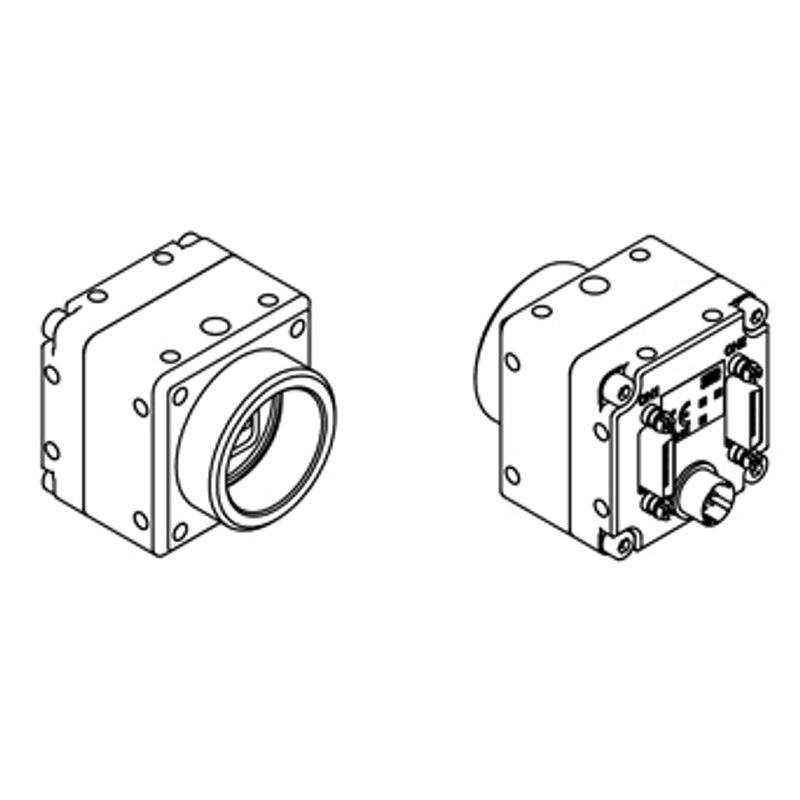
The STC-CMB200PCL-NIR is a compact 40×40×40.5 mm Camera Link camera using the ams OSRAM CMV2000 2/3" global shutter CMOS sensor at 2048×1088 pixels with 5.5 µm pixel pitch. It achieves up to 333.3 fps over Camera Link Full/Medium/Base (80-bit, protocol 2.1) and is optimized for near-infrared imaging via the removal of the IR-cut filter. Power is supplied via PoCL or external 12 Vdc with consumption under 3 W, and a C-mount lens interface is provided.
The STC-CMB200PCL-NIR is built around the ams OSRAM CMV2000, a 2/3" global shutter CMOS sensor resolving 2048 x 1088 pixels at a 5.5 µm pixel pitch. Global shutter means every pixel integrates light simultaneously, eliminating the motion blur and geometric distortion that rolling shutter architectures introduce on moving parts or under strobe illumination — a non-negotiable property for high-speed inspection on a conveyor or for robot-guided pick-and-place. At full 2.23 MP resolution the camera sustains 333.3 fps over Camera Link Full/Medium/Base (80-bit, protocol 2.1), making it viable for capturing fast-moving targets that would smear conventional cameras, while the 2/3" format keeps the optical footprint compatible with standard C-mount lenses.
The NIR designation is the defining product differentiation: Sentech has removed the IR-cut filter that normally blocks wavelengths above ~700 nm. Paired with an 850 nm or 940 nm LED ring or coaxial illuminator the camera can image through surface contamination, plastic packaging, or ambient visible-light interference that would corrupt a standard monochrome image. The 5.5 µm pixel is well matched to NIR — larger pixels collect more photons per unit time, partially compensating for the lower quantum efficiency that silicon sensors exhibit in the 800–1000 nm band. This makes the camera effective at the short integration times that 333.3 fps demands. Power is available via Power over Camera Link (PoCL) or an external 12 Vdc supply, with total consumption under 3 W — low enough to run from a frame grabber's PoCL rail and simplify cabinet wiring.
The 40 x 40 x 40.5 mm body and 90 g mass place the STC-CMB200PCL-NIR in the compact-camera bracket used on robot end-effectors and tight fixture mounts. Camera Link Full/Medium/Base backward compatibility means the same camera head can be operated at different modes during integration testing with a lower-cost grabber and then configured for full bandwidth in production without a hardware swap. The C-mount accepts the broad catalog of industrial-grade C-mount lenses designed for 2/3" image circles; designers should confirm the lens covers the full 7.168 x 5.984 mm sensor active area and, for NIR use, that the lens coatings and glass choices do not introduce significant NIR focal shift relative to the visible calibration wavelength.
Best for
High-speed surface defect inspection of reflective or translucent components (semiconductor wafers, glass panels, film) where 333.3 fps full-resolution capture eliminates motion blur at line speeds that outpace standard cameras.
NIR-band imaging applications that need to look through tinted plastic packaging, printed labels, or visible-light glare — such as fill-level verification in opaque bottles or blister-pack content inspection — using 850–940 nm illumination invisible to standard cameras.
Robot guidance and bin-picking systems that require distortion-free instantaneous exposure from a global shutter combined with the compact 40 mm cube form factor suited to end-effector mounting.
Dimensional measurement of fast-moving parts on a conveyor where the global shutter locks geometry at any trigger moment and the 2048-pixel horizontal axis provides sufficient resolution for sub-pixel edge detection across a 2/3" field.
Traceability code reading (1D/2D) and OCR on products moving at high speed, where the NIR channel rejects ambient lighting variation and the global shutter preserves symbol geometry at capture.
Selection notes
Camera Link Full/Medium/Base (80-bit, CL 2.1) is the camera's interface; achieving 333.3 fps at full 2048 x 1088 resolution requires sufficient grabber bandwidth — confirm your frame grabber's supported mode and data rate before specifying.
Because the IR-cut filter has been removed, visible-light calibration targets and focus tools will produce a focal plane offset from the NIR working wavelength. Lens selection and focus calibration must be performed at the intended NIR illumination wavelength (e.g., 850 nm or 940 nm) to maintain dimensional accuracy.
The C-mount lens chosen must cover the full 2/3" (approximately 7.168 x 5.984 mm) image circle; lenses specified only for 1/2" or smaller sensors will exhibit significant corner shading and resolution falloff at the 2048 x 1088 active area edges.
Operating temperature is rated -5 °C to +40 °C. Installations in cold environments (freezer tunnels, outdoor enclosures) or near heat sources must verify ambient stays within this range; housing or enclosure conditioning may be required.
At under 3 W total draw, PoCL supply from a compatible frame grabber is feasible, but verify the grabber's PoCL current budget if multiple cameras share the same controller chassis — current stacking can exceed the grabber's rated PoCL output.
Matched automatically by: lens mount fits the camera mount · lens image circle covers the camera sensor — this camera: C-Mount · 2/3" (7.168 × 5.984 mm approx.) sensor.
By category
All 198C-mount lenses 135Telecentric lenses 60F-mount / large-format lenses 3
By brand
All 198Omron / Sentech 66Basler 59iRAYPLE 48Datalogic / Datasensing 25
These steps take an Omron Sentech (STC) camera from the box to a stable first image and on to your own application. They apply across the GigE Vision, USB3 Vision and CoaXPress STC families; the interface only changes how you cable and power the camera.
Download and install the Sentech SDK on the host PC. The package provides StViewer, the viewing and configuration software you use to bring the camera up, and StApi, the programming SDK you integrate later. Because the cameras are GenICam/GenTL-compliant, StApi also registers a GenTL producer, so any GenICam-compliant third-party vision software can discover and drive the camera as an alternative front end.
2. Cable, power and connect the camera
Connect according to the interface. GigE Vision: link to a Gigabit NIC (use PoE or the separate power input) and put the camera and host on the same subnet; for USB3 Vision use a USB 3.x port and a certified cable; for CoaXPress (STC) connect to a CoaXPress frame grabber, which also supplies Power-over-Coax. Then open StViewer and let it enumerate the camera. If a GigE camera does not appear, check the IP configuration and firewall, and on USB3 confirm the host bandwidth and driver.
3. Configure exposure, gain and white balance
Open the device in StViewer and start a live stream. Set exposure and gain for a well-exposed, low-noise image: raise exposure first and only add gain when more light or a faster shutter is not an option, keeping exposure short enough to freeze motion on global-shutter models. On colour cameras, run white balance under your actual production lighting. Adjust the lens aperture and focus on a representative target before tuning anything else.
4. Set the trigger and grab a first image
Start in free-run (continuous) acquisition to confirm a clean, stable image. For inline inspection switch to hardware or software triggering: select the trigger source, set the active edge and any delay, and wire the strobe or illumination to the camera's I/O so lighting fires with each exposure. Acquire and save a frame in StViewer; this saved image is your reference for the SDK stage and for downstream inspection.
5. Move to the StApi SDK (or any GenICam software)
Once the image is stable, reproduce the same settings in code. Use StApi to open the device, apply the GenICam features you validated in StViewer (exposure, gain, trigger, pixel format) and grab frames into your application via the bundled C++, C, C#/.NET or Python interfaces; the included samples are the fastest starting point. Prefer a different stack? The same GenICam/GenTL camera works with third-party vision libraries. With a reliable feed, you can route it into a deep-learning inspection such as Rosepetal for AI-based defect detection.
Frequently asked questions
The STC-CMB200PCL-NIR achieves its rated 333.3 fps at 2048 x 1088 over Camera Link Full/Medium/Base (80-bit, protocol 2.1). Reaching full frame rate at full resolution requires a grabber with sufficient bandwidth for the Camera Link Full mode data path. A grabber limited to Camera Link Base will operate the camera at lower frame rates. Check your grabber's supported mode and bandwidth before assuming full-speed operation.
Yes. Without the IR-cut filter, visible wavelengths from roughly 400–700 nm are still detected but ambient NIR (sunlight, incandescent lamps) will also reach the sensor, raising background and reducing contrast in uncontrolled lighting. The camera is optimized for controlled NIR illumination environments; if visible-light use is needed, an external NIR-blocking filter must be placed in the optical path.
The camera uses a C-mount and has a 2/3" sensor (approximately 7.168 x 5.984 mm active area). Select C-mount lenses rated for 2/3" image circle or larger to avoid corner vignetting. For NIR applications also verify that the lens has low chromatic focal shift between visible and NIR wavelengths, or focus at the operating NIR wavelength.
Yes — Power over Camera Link (PoCL) is supported. The camera draws under 3 W at 12 Vdc, which is within the PoCL budget of most modern frame grabbers. Verify your specific grabber's PoCL current rating, especially in multi-camera configurations.
If your targets move — on a belt, a rotating stage, or a robot arm — global shutter is important. It integrates all pixels simultaneously so there is no line-by-line skew. Rolling shutter cameras introduce geometric distortion on moving objects even under strobe, because the reset and readout rows are not coincident. At 333.3 fps even short triggers see significant object translation, so global shutter is the correct choice for this speed class.